
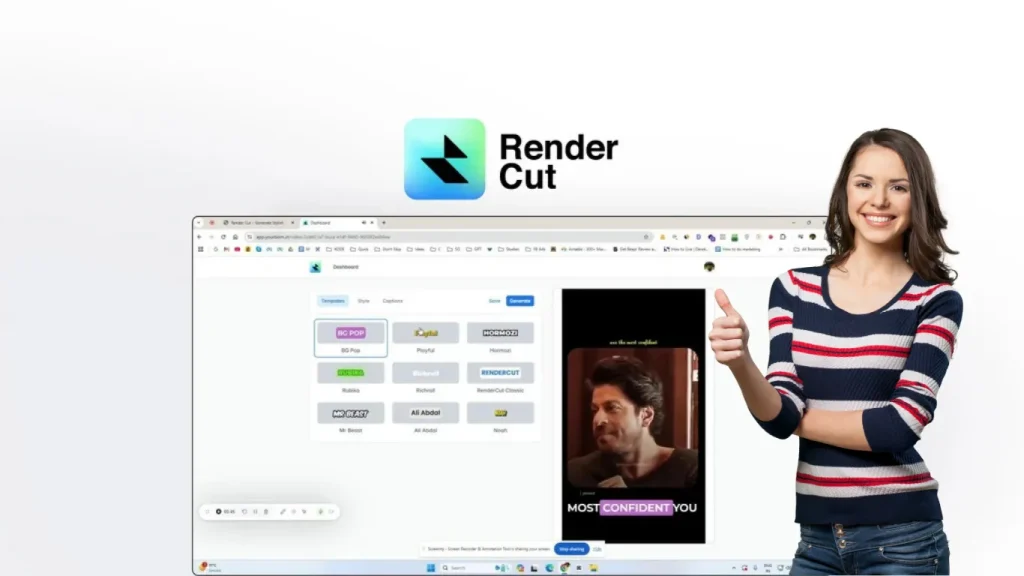
Grab the Rendercut Lifetime Deal to create accurate, stylish subtitles instantly and save hours of video editing work.
Whether you’re a content creator, YouTuber, or videographer, RenderCut helps you transform your videos into engaging content with dynamic, customizable captions—in just seconds. Imagine saving time while boosting your video’s reach and professionalism effortlessly. Don’t let tedious subtitle work slow down your creative flow. With RenderCut’s AI-powered features, you can generate accurate subtitles, tailor fonts and animations, and export high-quality videos fast. Ready to elevate your videos and captivate your audience? Check out the Rendercut Lifetime Deal and start creating stunning videos today!
Introduction To Rendercut And Its Purpose
RenderCut is a specialized video editing tool designed to add stylish, animated subtitles quickly. It helps content creators save hours spent on manual captioning. The tool focuses on turning raw videos into engaging content with professional captions and smooth workflow. This introduction explains what RenderCut is, why unlimited video editing power is essential, and how it differs in the video editing market.
What Is Rendercut? An Overview
RenderCut is a user-friendly video editing software that automates subtitle creation. It generates dynamic, perfectly timed subtitles within seconds, reducing manual work. Users can customize fonts, colors, animations, and text placement to match their brand style.
- Instantly add stylish, animated subtitles
- Customize text styles and animations
- Supports auto-transcripts in 40+ languages
- Fast video exporting with no watermarks
- GDPR-compliant and AI-powered
The interface is intuitive, allowing quick edits and instant previews. It supports multiple video uploads per month depending on the plan, with limits on video length and file size.
In practice, the AI engine transcribes your video’s audio and aligns the subtitles to the speech timeline automatically. A common mistake is assuming the auto-transcript is perfect — always review for accuracy, especially with accented speech or background noise. If you frequently work with multilingual content, you might also find value in tools that offer similar AI capabilities, such as the Bind Ai Lifetime Deal.
The Need For Unlimited Video Editing Power
Content creators need fast and flexible tools. Manual subtitle editing takes a lot of time and slows down workflow. Unlimited video editing power means:
- Faster project completion
- Ability to handle many videos without limits
- More creative freedom with customization
- Consistent branding on all videos
- Better engagement through professional subtitles
RenderCut offers lifetime access plans that allow multiple video uploads and unlimited projects. This ensures creators can maintain a steady output without extra costs or restrictions.
For creators who publish multiple short videos each week, hitting a monthly upload cap can disrupt a content calendar. RenderCut’s tiered system lets you scale by stacking codes, but it’s important to estimate your average video volume before committing to a plan. Planning ahead this way helps you avoid the frustration of pausing production mid-month.
How Rendercut Stands Out In The Video Editing Market
RenderCut stands apart by focusing on subtitle automation combined with customization. Key factors include:
| Feature | RenderCut Advantage |
|---|---|
| Subtitle Generation | Fast, accurate, stylish, and animated subtitles with AI support |
| Customization | Variety of fonts, colors, animations, and templates |
| Ease of Use | Intuitive dashboard with instant preview and quick editing |
| Pricing Model | One-time payment for lifetime access including updates |
| Additional Features | Auto B-roll insertion, GDPR compliance, multilingual support |
Users praise its speed, quality, and the balance of features. It suits videographers, content creators, and YouTubers who need reliable captioning without complexity.
One honest trade-off is that RenderCut prioritizes subtitle automation over full timeline editing. If you need advanced multi-track video editing, you may need to pair it with a traditional NLE like DaVinci Resolve or Adobe Premiere Pro. For many short-form projects, though, the simplicity pays off.
 The main dashboard where you upload a video and begin editing captions.
Credit: appsumo.com
Key Features That Make Rendercut Unique
RenderCut stands out by simplifying video editing and subtitle creation. It saves time and improves video engagement. The tool fits creators of all skill levels, offering powerful functions in a clean interface. Below are the key features that make RenderCut unique and valuable for content creators.
Unlimited Video Editing: Breaking Free From Constraints
RenderCut allows users to work on unlimited projects without restrictions on the number of videos. While plans set limits on video uploads per month and video length, you can create as many projects as you want. This flexibility supports continuous creativity without worry about hitting hard caps.
- Unlimited projects with lifetime access
- Multiple plans allow stacking for higher upload limits
- Supports videos up to 7 minutes and 1 GB file size (with highest plan)
User-friendly Interface Designed For All Skill Levels
The interface is clean and intuitive, making it easy for beginners and pros alike. RenderCut uses a streamlined dashboard to edit captions, preview changes instantly, and export videos quickly. This reduces the learning curve and speeds up editing workflows.
- Simple caption editing with few clicks
- Instant preview of subtitle styles and animations
- Clear controls to customize text placement and colors
Advanced Editing Tools To Enhance Creativity
RenderCut offers dynamic subtitle customization that lets users tailor captions to fit their brand style. Choose from various fonts, colors, backgrounds, and animations. The tool also supports adding still and animated emojis to videos for extra expressiveness.
- Multiple subtitle templates and animation effects
- Control over font size, color, and text highlights
- Auto-generated transcripts in 40+ languages
- Option to add emojis to enhance viewer engagement
Seamless Integration With Various Media Formats
RenderCut handles a wide range of video files easily. The platform supports uploads up to 1 GB, accommodating high-quality videos. It works smoothly with different video formats, making it simple to import and export files for multiple platforms.
| Feature | Details |
|---|---|
| Maximum Upload Size | Up to 1 GB per video |
| Supported Video Length | Up to 7 minutes per video (top plan) |
| Language Support | Auto transcripts in over 40 languages |
| Export Options | High-quality videos ready for social media and websites |
High-speed Rendering For Efficient Workflow
RenderCut offers fast processing and rendering to keep projects moving smoothly. Uploads, subtitle generation, and exports happen quickly. The platform's speed reduces wait times so creators can publish content faster.
- Rapid subtitle generation in seconds
- Quick video export with no watermarks
- Responsive editing experience without lag
 Editing captions in the timeline view with style controls on the right.
Credit: appsumo.com
Step-by-Step: Adding Subtitles with RenderCut
Getting started with RenderCut is straightforward, even if you’ve never used automated captioning software before. Follow these steps to add stylish subtitles to your first video:
- Upload your video – Drag and drop an MP4 or MOV file (up to the plan’s size limit) into the dashboard. RenderCut supports common formats used by YouTubers and social media creators.
- Generate the transcript – Click the “Auto Transcript” button and select your video’s language. The AI will process the audio and create a timed subtitle file in seconds.
- Customize the style – Choose from available fonts, colours, background shapes, and animation effects. Preview each change instantly to see how it looks over your footage.
- Review and adjust timing – Click on any subtitle block to fine-tune its start or end time. You can also correct misheard words – a quick pass ensures accuracy.
- Export your video – Select export quality (high resolution is recommended for platforms like YouTube), then download the finished clip with embedded, watermark‑free subtitles.
A pro tip: if you produce a series of similar videos, save your style settings as a reference so you can replicate them quickly in future projects.
Pricing And Affordability Breakdown
RenderCut offers a unique pricing model that appeals to video editors and content creators seeking cost-effective solutions. Its lifetime deal provides long-term value with a one-time payment, unlike many tools requiring ongoing subscriptions. Understanding the pricing structure helps users make informed decisions and maximize their investment in video editing software.
Understanding The Lifetime Deal: What You Get
The RenderCut lifetime deal includes:
- One-time payment with lifetime access to the tool
- All future updates for Starter (Tier 1 and 2) and Growth (Tier 3) plans
- Ability to stack up to 3 codes for increased usage limits
- Key features such as stylish animated subtitles, auto transcripts in 40+ languages, and no watermarks
- Monthly video upload limits and processing time based on the number of codes purchased
Here is a breakdown of the plans:
| Plan | Price (One-time) | Video Uploads/Month | Max Video Length | Max Upload Size | Projects |
|---|---|---|---|---|---|
| 1 Code | $49 | 25 | 3 minutes | 500 MB | Unlimited |
| 2 Codes | $98 | 50 | 5 minutes | 700 MB | Unlimited |
| 3 Codes | $147 | 75 | 7 minutes | 1 GB | Unlimited |
Stacking codes is a smart way to increase your upload limits without paying monthly fees. For example, a creator producing five 3‑minute clips per week would quickly exhaust the 1‑code limit of 25 per month; two codes double that for a one‑time $98 investment. This is a fraction of what you would spend on a subscription‑based alternative over two years.
Cost Comparison: Rendercut Vs. Subscription-based Tools
Subscription video editing tools often charge monthly or yearly fees. These can add up quickly for heavy users.
- Typical subscription costs range from $10 to $30 per month
- Annual subscriptions can cost $120 to $360 or more
- Ongoing payments may increase overall cost over time
RenderCut’s lifetime deal requires a single payment starting at $49, locking in access and future updates.
| Option | Cost Year 1 | Cost Year 3 | Payment Model |
|---|---|---|---|
| RenderCut (1 Code) | $49 (one-time) | $49 (one-time) | One-time payment |
| Subscription Tool ($15/month) | $180 | $540 | Monthly subscription |
This makes RenderCut an excellent choice for budget‑conscious creators who want to avoid recurring charges. The one‑time purchase model is similar to what you find with other productivity tools available through platforms like Appsumo Discounts For Entrepreneurs.
Long-term Savings And Value For Video Editors
RenderCut’s lifetime deal offers significant savings over subscription models. Users pay once and avoid recurring fees.
Benefits include:
- Consistent access to all features and updates
- Ability to stack codes for higher usage without extra monthly costs
- No worries about price increases or subscription cancellations
- Ideal for content creators with steady or growing video editing needs
For editors managing many videos or tight budgets, RenderCut’s deal provides cost certainty and ease of use.
The monthly upload limits suit various workloads, while the customization options enhance video quality.
 Export screen showing resolution options alongside the three pricing tiers.
Credit: appsumo.com
Pros And Cons Based On Real-world Usage
RenderCut offers a balanced mix of strengths and areas needing improvement. Users praise its speed and subtitle quality but note some limitations. Real-world experience reveals what truly works and what could be better.
Advantages: What Users Love About Rendercut
- Fast subtitle generation: Creates stylish, animated subtitles within seconds.
- Customizable design: Adjust fonts, colors, animations, and text placement easily.
- User-friendly interface: Intuitive dashboard simplifies editing and previewing changes instantly.
- High-quality exports: Videos export in clear resolution, suitable for multiple platforms.
- Supports multiple languages: Auto transcripts available in 40+ languages.
- Boosts engagement: Professional captions enhance viewer retention and video appeal.
- No watermarks: Clean videos without branding distractions.
- Includes auto B-rolls: Adds stock footage to improve video storytelling.
From experience, the speed of subtitle generation is remarkable — a 5‑minute video with English audio processes in under 30 seconds. However, the true time savings come when you reuse custom templates, which RenderCut currently doesn’t save as presets. Manually reapplying colors and fonts each project is a minor friction point that a future update could solve.
Limitations And Areas For Improvement
| Limitation | Details | Impact |
|---|---|---|
| Caption accuracy in some languages | Portuguese subtitles often require manual fixes. | Extra editing time for non-English users. |
| File size limits | 500 MB max upload per video in starter plan. | Restricts 4K or high-bitrate videos. |
| Video length restrictions | 3 minutes max per video in basic plan. | Limits flexibility for longer content. |
| Lack of branding presets | Users must apply branding settings manually each time. | Slows down workflow for frequent users. |
| Editing and clip merging | No option to split or merge clips within the app. | Requires external editing tools for advanced edits. |
Another consideration is the lack of a built‑in video trimming feature. If your source clip has a long intro or outro, you need to cut it in another editor before uploading to RenderCut. This adds an extra step but isn’t a dealbreaker for most short‑form content.
User Testimonials And Feedback Highlights
“RenderCut saved me so much time and is worth every penny!” – Users appreciate how fast subtitles generate and how easy the tool is.
“Quality-price ratio is great, but some language accuracy needs work.” Many point out that Portuguese subtitles need improvement.
“The interface is clean and fast, but file size limits can be restrictive.” Creators with 4K videos want larger uploads or more flexible plans.
“Adding branding presets would speed up my editing.” Users want automation for repeated styling settings.
“Auto B-rolls and subtitle animations make videos look professional quickly.” Many praise the stylish, dynamic captions and stock footage features.
“RenderCut helps me prepare content for multiple platforms effortlessly.” The export quality and multi-language support stand out.
Common Mistakes to Avoid with RenderCut
Even with an intuitive tool, a few pitfalls can cost you time. Here are the most common mistakes and how to steer clear of them:
- Skipping the transcript review – The AI is impressive, but it can stumble on homophones (e.g., “there” vs. “their”) or background noise. Spend 2 minutes reading through the generated transcript before exporting.
- Ignoring the file size and length caps – Trying to upload a 10‑minute 4K clip on the basic plan will fail. Always check your plan’s limits first and trim or compress your video beforehand.
- Not stacking codes when you know you’ll need more volume – Many users buy a single code, hit the monthly upload cap, and then regret not grabbing two codes from the start. Estimate your typical monthly output before purchasing.
- Forgetting to set consistent branding on each project – Without presets, you’ll need to re‑apply your brand colours and fonts every time. Keep a screenshot of your preferred settings as a reference to speed up the process.
- Expecting full video editing capabilities – RenderCut is a subtitle‑first tool. If you need to splice clips, add transitions, or colour‑grade, handle those tasks in a dedicated editor before importing.
Specific Recommendations For Ideal Users And Scenarios
RenderCut suits various users and video editing situations. It shines by adding stylish, animated subtitles quickly. This section highlights who benefits most and the best ways to use RenderCut effectively.
Who Should Consider The Rendercut Lifetime Deal?
The Rendercut Lifetime Deal fits well for:
- Content creators aiming to enhance video engagement with minimal effort.
- Videographers needing fast, polished subtitles for client projects.
- YouTubers who want to boost viewer retention with clear captions.
- Beginners who seek an easy-to-use tool without complex editing.
- Small businesses looking for cost-effective video captioning solutions.
The deal offers lifetime access, making it ideal for long-term use without recurring fees. Users who produce many short videos benefit most, given the upload limits per plan.
On the other hand, creators who regularly produce videos longer than 7 minutes or need 4K resolution may find the upload limits restrictive. Consider whether your typical project fits within the file size and duration caps before purchasing. If you work with longer content, you might pair RenderCut with a traditional editor that handles trimming and compression.
Best Use Cases: From Beginners To Professional Editors
| User Level | Best Use Case | Key Benefit |
|---|---|---|
| Beginners | Adding subtitles to social media clips | Simple interface, quick results |
| Intermediate Creators | Customizing subtitles for branding | Templates, font styles, and color options |
| Professional Editors | Fast captioning for client projects | High-quality exports, bulk uploads |
The tool supports auto-generated transcripts in over 40 languages, though some languages like Portuguese may need minor manual fixes. Its customization options allow matching subtitles with brand styles easily.
Advanced editors can further speed up their workflow by batch‑uploading multiple clips and processing them sequentially — useful for a series of social media snippets. For a deeper look at how one‑time payment tools compare with subscription models, check out this Microsoft Office Home 2024 Review.
How Rendercut Enhances Productivity In Different Video Projects
RenderCut speeds up subtitle creation and editing for various projects:
- Social Media Videos: Generate captions in seconds to increase engagement.
- Marketing Content: Customize subtitles to align with brand identity.
- Interview Clips: Quickly add accurate captions and b-roll footage.
- Educational Videos: Improve accessibility with clear, timed subtitles.
The tool’s intuitive dashboard allows instant preview and quick edits, reducing manual work significantly. Exporting videos is fast, producing high-quality files ready for any platform.
Users report smoother workflows and less time spent on tedious captioning tasks. RenderCut is especially helpful for projects requiring multiple short videos or frequent subtitle updates.
One feature that often goes overlooked is the auto B‑roll insertion. It can save considerable time when creating engaging explainer videos by adding contextually relevant stock footage between subtitle segments. For more tips on streamlining your video production pipeline, consider reading this Roundups Lifetime Deal Review.
https://www.youtube.com/watch?v=OLPtgezbfXs
Frequently Asked Questions
What Is The Rendercut Lifetime Deal?
The Rendercut Lifetime Deal offers permanent access to Rendercut software with a one-time payment. It saves money on recurring fees and unlocks all core features instantly.
How Does Rendercut Improve Video Editing Workflow?
Rendercut simplifies video editing with fast rendering and smart cutting tools. It boosts productivity by reducing editing time and enhancing output quality.
Who Benefits Most From The Rendercut Lifetime Deal?
Content creators, video editors, and marketers benefit most. The deal suits those seeking cost-effective, powerful video editing without subscription hassles.
Are There Any Limitations In The Rendercut Lifetime Deal?
No major limitations exist. The deal includes all updates and support, ensuring users access the latest features indefinitely.
Can I use RenderCut on multiple devices?
Yes, your RenderCut license is tied to your account, so you can log in and work from different computers — handy for creators who switch between a desktop and a laptop.
Does RenderCut support burning subtitles directly into the video file?
Absolutely. When you export, the subtitles are permanently embedded (hard‑coded) into the video. This ensures they appear on any platform without extra caption files.
What languages does the auto‑transcript support?
The tool advertises support for over 40 languages, including English, Spanish, French, German, Portuguese, Hindi, and more. However, users have reported that smaller languages may need manual corrections — follow the transcript review advice mentioned earlier.
Is there a money‑back guarantee?
Yes, most lifetime deals on AppSumo come with a 60‑day money‑back guarantee. Check the specific product page for the most current policy before purchasing.
How do I download my exported videos?
Once processing is complete, a download button appears on the project page. Simply click it to save the MP4 file to your computer. There’s no limit on the number of downloads per project.
Can I use RenderCut for client work?
Yes. The output is watermark‑free and professional, so you can charge clients for videos edited with RenderCut — no attribution required. The one‑time fee covers commercial use.
Conclusion
RenderCut saves you time by adding stylish subtitles quickly and easily. It helps videos look professional and keeps viewers engaged. Customizing fonts, colors, and animations fits any brand or style. The tool works fast, so editing and exporting videos is simple. With a one-time payment, you get lifetime access and future updates. This deal suits content creators, videographers, and YouTubers who want better videos without extra work. Try RenderCut now to make your videos clearer and more attractive.


1 thought on “Rendercut Lifetime Deal – Add Stylish Subtitles & Save Editing Time”