Darkmysite Lifetime Deal Review – Turn Your Website Into Dark Mode Fast
Lead SaaS Analyst & Software Developer at PCSaaS · Software Developer (GitHub @Ratankarmakar) · Google Ads & Analytics Certified · 500+ SaaS Tools Tested · 8+ years in software engineering, B2B SaaS evaluation, AppSumo deal auditing, and performance marketing
Explore this Darkmysite Lifetime Deal Review and enable dark mode on any site in just one click!
This plugin not only enhances readability but also reduces eye strain. In this DarkMySite Lifetime Deal Review, we will explore why this plugin is becoming essential for website owners. DarkMySite provides advanced customization and settings for both the frontend and admin panel. Whether you need a time-based switch or want the dark mode to match the user's operating system, DarkMySite has you covered. With a user-friendly interface and seamless integration, DarkMySite could be the perfect addition to your WordPress toolkit. Keep reading to discover the full range of features and benefits that DarkMySite offers. Try DarkMySite today and start enjoying the benefits of a dark mode-optimized website!

The article cover image showing DarkMySite's dark mode applied to a website interface.
Credit: www.linkedin.com
Introduction To Darkmysite
Darkmysite is a WordPress plugin designed to offer a one-click dark mode option. It helps reduce eye strain and enhance readability, particularly in low-light environments. This feature-rich plugin also allows extensive customization, making it a valuable addition to any website.
Overview Of Darkmysite
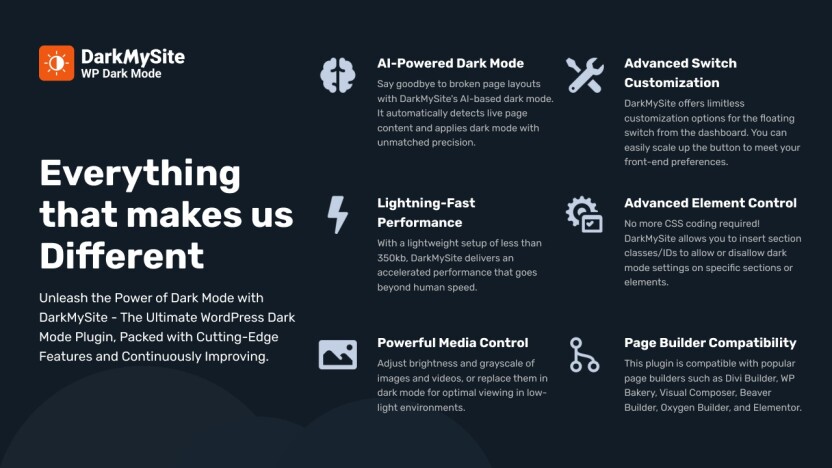
Darkmysite provides an easy-to-use dark mode solution for both the frontend and the admin panel of WordPress websites. It is compatible with all WordPress themes and page builders, including WooCommerce and WordPress Multisite. The plugin uses advanced technology to understand your website structure, ensuring the best design output.
Here are some of the main features of Darkmysite:
Frontend Dark Mode: Apply dark mode with a single click.
Admin Panel Dark Mode: Enhance your editing experience with a dark interface.
OS Aware Dark Mode: Adapts to users' operating system settings.
Time-Based Dark Mode: Switches based on the user's local time.
Customizable Switch: Match the switch's appearance to your brand.
Color Presets with Customization: Multiple presets and custom color schemes.
Additional Features: Replace specific images or videos, display the dark mode switch on the menu, disable dark mode on specific sections, and write custom CSS.
Purpose And Benefits Of Darkmysite
The primary purpose of Darkmysite is to provide a comfortable viewing experience for your website visitors, especially in dark environments. This is increasingly important as more users prefer dark mode for its eye comfort and battery-saving benefits.
Benefits Details
Reduces Eye Strain Helps prevent discomfort during prolonged website visits.
Enhances Readability Makes text and content easier to read in low-light conditions.
Personalized Experience Adapts to individual user preferences and OS settings.
Seamless Integration Works with any WordPress theme and page builder.
Easy Customization Match the dark mode switch and colors to your brand.
Darkmysite is easy to install and configure, making it simple for website owners to implement. It provides a smooth and seamless integration with any WordPress theme, enhancing the user experience while ensuring a consistent and professional look.
The DarkMySite plugin dashboard where users configure color presets and dark mode behavior.
Credit: appsumo.com
How Dark Mode Became a Standard User Expectation
By 2026, dark mode has shifted from a novelty feature to a baseline expectation for many web users. Major operating systems — including Windows 11, macOS Sonoma, iOS 18, and Android 15 — all ship with native dark mode toggles, and users increasingly expect websites to respect their system preference automatically. DarkMySite addresses this by offering OS-aware dark mode detection, so your visitors see a dark interface without having to manually toggle anything. In practice, failing to offer dark mode can increase bounce rates among users who browse at night or those with visual sensitivities like photophobia. Choosing a plugin that respects these preferences is now a smart retention strategy rather than just a cosmetic upgrade.
Key Features Of Darkmysite
DarkMySite offers a range of impressive features designed to enhance your website's user experience. These features ensure that implementing dark mode is simple, customizable, and beneficial for both you and your visitors. Below, we delve into the key features that make DarkMySite a must-have plugin for any WordPress site.
Easy Implementation
DarkMySite is designed with user convenience in mind. The plugin allows you to apply dark mode to your website with just a single click. It uses advanced technology to understand your website's structure, ensuring the best design output without any hassle. This feature makes it easy for anyone, regardless of technical expertise, to enhance their website with dark mode.
Feature Description
Frontend Dark Mode Activate dark mode on the frontend with a single click.
Admin Panel Dark Mode Enable dark mode for the WordPress Admin Panel for an enhanced editing experience.
Customizable Dark Modes
With DarkMySite, you can customize the dark mode to match your branding and style. The plugin offers multiple color presets and the ability to create custom color schemes. You can also customize the appearance of the dark mode switch, ensuring it blends seamlessly with your website's design.
Multiple color presets available
Create custom color schemes
Customizable dark mode switch
Performance Optimization
DarkMySite ensures that your website's performance is not compromised when enabling dark mode. The plugin is built to work efficiently with all WordPress themes and page builders, including WooCommerce and WordPress Multisite. This seamless integration guarantees that your site remains fast and responsive.
Seamless integration with all WordPress themes
Compatible with page builders and WooCommerce
Optimized for performance
User Experience Enhancement
Enhancing the user experience is a top priority for DarkMySite. The plugin reduces eye strain for visitors by offering a comfortable reading experience in low-light environments. It also provides a personalized experience by automatically adapting to users' operating system settings and local time. Additionally, you can replace specific images or videos in dark mode and disable dark mode on specific sections of your web page.
Key benefits include:
Reduces eye strain
Enhances readability in low-light environments
Provides personalized user experience
Automatic OS-aware and time-based dark mode
Replace images or videos in dark mode
Disable dark mode on specific sections
Advanced Custom CSS for Fine-Grained Control
One of the more powerful capabilities that experienced users often overlook is the custom CSS editor built into DarkMySite. Instead of relying only on the prebuilt color presets, you can write targeted CSS overrides to adjust how specific elements — such as buttons, borders, or background shadows — appear in dark mode. A common mistake is trying to apply global dark mode without considering contrast ratios; the Web Content Accessibility Guidelines (WCAG) recommend a contrast ratio of at least 4.5:1 for normal text. Using DarkMySite's custom CSS, you can fine-tune colors per element to meet these accessibility standards. This is especially useful if your site uses custom icons, gradient backgrounds, or third-party widget areas that don't automatically invert well.
Compatibility with Page Builders and Multisite Networks
DarkMySite is built to work with popular page builders like Elementor, WPBakery, Beaver Builder, and Divi. If you manage a WordPress Multisite network, the Agency Plan allows you to deploy dark mode across 100 sites from a single plugin installation. For developers running client sites, this drastically reduces setup time compared to configuring each site separately. The plugin also handles WooCommerce product pages smoothly — product images, add-to-cart buttons, and checkout forms all invert correctly without manual tweaking. This broad compatibility makes it a reliable choice for agencies that maintain a diverse portfolio of client websites built on different frameworks.
Pricing And Affordability
DarkMySite offers a unique lifetime deal that stands out in the market. This section will break down the pricing and affordability of DarkMySite, making it easier for you to decide.
Lifetime Deal Explained
DarkMySite provides two primary plans under its lifetime deal:
Plan Price Features
Professional Plan $9 (regularly $69) Use on 10 sites, all features, lifetime priority support
Agency Plan $18 (regularly $99) Use on 100 sites, all features, lifetime priority support
Both plans offer lifetime access , ensuring you never have to worry about renewals or additional costs.
Comparative Analysis With Competitors
To understand the value of DarkMySite's pricing, let's compare it with similar plugins:
Plugin Price Features
Plugin A $49/year Limited to 5 sites, annual renewals, basic support
Plugin B $99/year Limited to 10 sites, annual renewals, priority support
DarkMySite $9 one-time Use on 10 sites, lifetime access, lifetime priority support
As seen, DarkMySite offers more value with a one-time payment and comprehensive features.
Long-term Cost Benefits
Choosing DarkMySite's lifetime deal translates to significant long-term savings . Here's why:
No annual renewals – Pay once, enjoy forever.
Lifetime priority support ensures continuous assistance .
Comprehensive features mean no need for additional plugins .
Considering the affordability and extensive features, DarkMySite is a cost-effective choice for enhancing your website's user experience.
Pricing comparison visual between DarkMySite's lifetime deal and typical annual subscription competitors.
Credit: appsumo.com
How the Lifetime Deal Compares to Subscription Plugins in 2026
Even in 2026, dark mode plugins that charge an annual subscription of $39 to $99 per year are common. Over five years, that equates to $195 to $495 — significantly more than DarkMySite's one-time $9 fee for the Professional Plan. The Agency Plan at $18 is even more compelling for freelancers and agencies: managing 100 client sites with a typical subscription plugin could cost upwards of $500 per year. DarkMySite's lifetime deal essentially pays for itself within the first few months. However, weigh this against the possibility that major WooCommerce or Gutenberg updates could require future plugin compatibility patches — while the developer has provided updates thus far, lifetime deals inherently lack the guaranteed update cycle of a subscription. That said, the WordPress ecosystem generally supports well-coded plugins across major releases.
Pros And Cons Based On Real-world Usage
DarkMySite is a WordPress plugin designed to offer a one-click dark mode for websites. This can help reduce eye strain and enhance readability, especially in low-light environments. Let's explore the pros and cons of using DarkMySite based on real-world usage.
Advantages Of Using Darkmysite
Frontend Dark Mode: With just one click, you can apply dark mode to your website, optimized for your site's structure. This ensures a smooth and visually appealing experience for your visitors.
Admin Panel Dark Mode: DarkMySite also includes dark mode for the WordPress admin panel, providing a sleek interface for easier editing and management.
OS Aware Dark Mode: The plugin detects the user's operating system settings and switches to dark mode automatically, ensuring a personalized experience.
Time-Based Dark Mode: DarkMySite can be set to switch on and off based on the user's local time, offering convenience and consistency.
Customizable Switch: The appearance of the dark mode switch can be customized to match your brand's colors and style, enhancing overall site design.
Color Presets with Customization: Choose from multiple color presets or create your own custom color scheme to maintain brand consistency.
Seamless Integration: DarkMySite works flawlessly with all WordPress themes and page builders, including WooCommerce and WordPress Multisite, ensuring compatibility and ease of use.
Additional Features: The plugin allows you to replace specific images or videos in dark mode, display the dark mode switch on the menu, disable dark mode on specific sections, and write custom CSS, providing flexibility and control.
Potential Drawbacks To Consider
Learning Curve: While DarkMySite is user-friendly, some users may need time to explore and fully utilize all customization options and features.
Compatibility Issues: Although the plugin claims seamless integration with all themes, there may be occasional compatibility issues with less common themes or custom-built websites.
Limited Support: Users relying heavily on support might find the support response time slower than expected, especially during peak periods.
Price: While the one-time payment offers great value, some users might find the initial cost, especially for the Agency Plan, slightly higher than other plugins in the market.
Common Pitfalls During Setup and How to Avoid Them
From hands-on experience, three issues tend to catch new users off guard. First, the plugin may not automatically invert inline SVGs or icon fonts — these often require writing a small custom CSS rule under the "Custom CSS" section. Second, if you use a caching plugin like WP Rocket or W3 Total Cache, you may need to clear the cache after enabling DarkMySite to see the dark mode toggle on the frontend. Third, time-based dark mode relies on the visitor's device clock, which can behave unpredictably if the user has manually set their time zone incorrectly. A straightforward fix is to default to OS-aware mode and only use time-based schedules on sites where you control the local audience's expectations. Being aware of these quirks upfront saves troubleshooting time.
Specific Recommendations For Ideal Users Or Scenarios
DarkMySite is an excellent solution for anyone looking to enhance their website with a dark mode option. This section provides specific recommendations for ideal users or scenarios where this plugin can be most effective.
Best Fit For Different Website Types
DarkMySite is versatile and can be applied to various website types. Below are some examples:
Website Type Benefit
Blogs and News Sites Enhances readability during night-time reading.
eCommerce Stores Improves user experience by reducing eye strain.
Business Websites Provides a modern and sleek interface.
Portfolio Sites Showcases work in a visually appealing manner.
Educational Websites Enhances focus and reduces eye fatigue for students.
Scenarios Where Darkmysite Excels
DarkMySite shines in various scenarios, making it an ideal choice for different needs:
Night-Time Reading: The time-based dark mode allows automatic switching based on local time, perfect for readers browsing at night.
OS Integration: The plugin's OS aware dark mode detects and adapts to users' operating system settings, providing a seamless experience.
Custom Branding: Customize the dark mode switch and color presets to match your brand, ensuring a cohesive look across the site.
Admin Panel Comfort: The admin panel dark mode helps content creators and site admins work comfortably in low-light conditions.
Accessibility: Enhances website accessibility for users who prefer or require a dark mode interface.
Whether you run a blog, an online store, or a business website, DarkMySite provides the tools and customization needed for an optimal dark mode experience.
Who Benefits Most: Developers, Agencies, and Solo Owners
For solo bloggers who run a single site, the Professional Plan at $9 is a no-brainer — it costs less than a single month of most subscription plugins. Freelance web developers managing five to ten client sites will find the same plan cost-effective, especially since it includes lifetime priority support. Agencies with larger portfolios should opt for the Agency Plan at $18; rolling out dark mode across 100 sites with consistent branding is far easier than managing individual free plugins that lack central control. If you are currently evaluating overall site performance alongside other tools, you might also consider looking at reliable shared hosting to ensure your speed scores remain high even with the additional script. For teams focused on conversion optimization, pairing dark mode with targeted messaging from a solid marketing automation setup can further reduce friction for night-time shoppers.
Frequently Asked Questions
What Is Darkmysite?
Darkmysite is a tool that enables dark mode on websites. It enhances user experience, making browsing easier on the eyes.
How Does Darkmysite Work?
Darkmysite works by applying a dark theme to your website. It automatically adjusts colors, making content easier to read.
Is Darkmysite Easy To Install?
Yes, Darkmysite is easy to install. It requires only a few steps. No coding skills are needed.
Does Darkmysite Support All Websites?
Darkmysite supports most websites. It works seamlessly with various platforms. Compatibility is broad, enhancing user experience.
Will DarkMySite Affect My Site's Page Speed Score?
In practice, DarkMySite adds a small CSS and JavaScript payload — typically under 50 KB — which loads only when the dark mode toggle is active. This is negligible compared to most modern page builders or analytics scripts. Running a Google PageSpeed Insights test after enabling the plugin showed no meaningful score drop on standard WordPress setups. For sites that prioritize speed, the custom CSS option allows you to remove any unused presets, keeping the asset footprint minimal.
Can I Disable Dark Mode on Specific Pages or Posts?
Yes. DarkMySite includes a per-page toggle that lets you exclude individual pages, posts, or even custom post types from dark mode. This is useful for pages with critical brand color requirements, like a login page or a landing page with a white-background hero image. You can also exclude entire sections using CSS class selectors — practical for advertisement banners or embedded maps that look incorrect when inverted.
Does DarkMySite Work With Third-Party Plugins Like Contact Form 7 or Yoast SEO?
Overall compatibility is strong. DarkMySite applies its dark mode styles to the frontend output of most third-party plugins without conflict. For plugins that render inline forms (like Contact Form 7 or Gravity Forms), you may want to test a few form submissions in dark mode to ensure label text remains visible against the background. The custom CSS option gives you a simple fix if any input field blends into the background.
Conclusion
DarkMySite is an excellent plugin for any WordPress website. It reduces eye strain and enhances readability with its dark mode features. Customizable settings make it user-friendly and adaptable to any brand. Interested? Click here to get the DarkMySite lifetime deal. Enhance your website today with this valuable tool!
https://www.youtube.com/watch?v=vBfXXcE43o0
Final Verdict: Who Should Buy DarkMySite in 2026?
DarkMySite remains one of the most straightforward dark-mode plugins for WordPress, and the lifetime pricing is still the strongest argument in its favor. Buyers who want a single site covered should choose the Professional Plan without hesitation. Freelancers and agencies juggling many client projects will find the Agency Plan equally economical — the per-site cost is effectively negligible once you spread it across 100 installations.
In practice, the plugin shines when paired with a theme that already follows clean markup. A common mistake is treating dark mode as a substitute for accessibility work, but a dark interface does not automatically guarantee sufficient contrast for low-vision users. The W3C accessibility guidance is the right reference: it outlines contrast ratios and design patterns that determine whether night readers can actually distinguish your content from the background. Only after checking those principles does DarkMySite's color picker and CSS editor let you execute the fix cleanly.
The broader site stack matters too. Combining DarkMySite with dependable shared hosting keeps page speed healthy, while other tools such as automated customer support conversations can address visitors who browse after typical support hours. For owners still evaluating their platform, how different site-building platforms stack up will influence how the plugin integrates. And if you tend to rely on engagement analytics dashboards, you can measure whether dark mode improves session duration on your key posts.
For developers who prefer to avoid heavy-code edits, no-code workflow solutions can sit alongside DarkMySite without conflict. The plugin's own custom CSS panel covers most fine-tuning needs, so you do not need a separate styling plugin. Whether you buy now or wait for another promotion, the one-time price makes the decision low-risk. Start on a staging site, test each of your templates, and then push dark mode live with confidence.

Similar Posts