Maekersuite Lifetime Deal Review: Is It Worth It?
Lead SaaS Analyst & Software Developer at PCSaaS · Software Developer (GitHub @Ratankarmakar) · Google Ads & Analytics Certified · 500+ SaaS Tools Tested · 8+ years in software engineering, B2B SaaS evaluation, AppSumo deal auditing, and performance marketing
Maekersuite Lifetime Deal Review is a tool for YouTubers. It helps with research, scripting, and video optimization. Right now, it’s available as a lifetime deal on AppSumo. This makes many people wonder if it’s worth the investment. In this review, we will break down Maekersuite’s features, pricing, and user feedback to help you decide.
What is Maekersuite?
Maekersuite makes video creation simple. It uses AI to check millions of YouTube videos. It helps you find trending topics and see what your competitors are doing. With this info, you can write better scripts that work for search engines and engage viewers. The tool was made by a video production company and social media agency to make video creation easier and cheaper for small businesses and people.
For creators who spend hours manually scanning YouTube search results and competitor channels, Maekersuite replaces that manual research loop with a single dashboard. The tool targets the common pain point of staring at a blank page without knowing which topic will actually get views. By surfacing data on search demand and competition before you write a word, it helps you invest your filming time in topics with higher probability of traction. This research-first approach is what distinguishes it from a simple text generator.
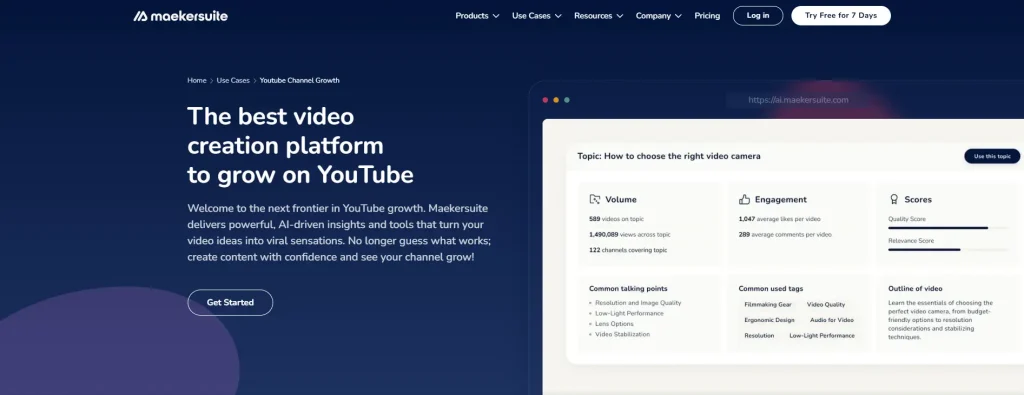
The research dashboard aggregates video ideas and competitor performance in one view.
Maekersuite Features and Benefits
Maekersuite has many tools to make video production easier. Let’s look at the main features:
Video Idea Generator: Stuck on ideas? Maekersuite gives you trending topics for your niche. For example, if you focus on tech reviews, it may suggest “Top 5 AI Tools” or “The Future of Virtual Reality.” You can adjust the ideas to suit your audience.
Video Performance and Quality Indicator: This tool shows how your video ideas might perform. It looks at similar YouTube videos and gives you a sense of how well they did.
Video Quality Indicator: Want to know what works for your competitors? This tool shows you what they are doing well and gives you tips to improve your own videos.
YouTube Keyword and SEO Analyzer: These tools help you find popular keywords with low competition. You can use them to improve your titles, descriptions, and tags for better ranking.
YouTube Script Generator: Maekersuite’s AI tool makes a full script in minutes. You can change it to fit your tone, goals, and audience, saving time.
Video Outline Generator: Before writing your script, Maekersuite helps you create a strong outline. This makes your video flow well and keeps it interesting.
Competitor Analysis: You can check your competitors’ videos to see what works. Maekersuite breaks down data like watch time and engagement to help improve your content.
Outlier Videos: Maekersuite shows you top videos in your niche. You can learn from their success and use those ideas in your own videos.
Auto-Generated Descriptions and Tags: Maekersuite helps you save time by making SEO-friendly descriptions and tags. This helps your videos rank higher.
Watch Time Analysis: This tool looks at how long people watch your videos. It gives suggestions to help improve your content.
These features have many benefits:
More Efficiency: Automate tasks like research and writing, so you have more time to film and edit.
Better SEO: Improve your videos’ visibility on search engines.
More Engagement: Make content that your audience loves.
Data Insights: Understand your niche, audience, and competitors to make your content better.
How to Actually Use Maekersuite (Step-by-Step)
In practice, Maekersuite works best when you use it as a research and drafting layer before you touch your camera. The fastest workflow looks like this:
Start with Explorations – type a broad topic from your niche (for example “budget mirrorless cameras” or “SQL for beginners”), and review the list of video ideas it returns.
Pick a video idea that has a strong performance score, then open the competitor analysis to see why similar videos worked.
Go through the outlier videos for your niche to identify patterns in titles, hooks, and thumbnail wording.
Generate an outline with the Video Outline Generator, then turn it into a script with the YouTube Script Generator.
Run the keyword and SEO analyzer before publishing; update your title, description, and tags as a final metadata pass.
A common mistake is skipping the outline step and going straight to a full script. AI scripts are easier to keep on-message when the outline already matches your video’s actual structure. You can also pair Maekersuite with a solid keyword research workflow to decide which search terms deserve a video in the first place.
Once you have the AI-generated script, read it aloud while timing yourself before you finalise it. A common mistake is publishing a script that reads well on paper but feels stiff when spoken. Editing for your natural speaking rhythm—shortening long sentences, adding conversational pauses, and adjusting transitions—turns a generic AI draft into something that sounds like you, not a robot. Many creators find that feeding the tool a reference video URL or a short note about their preferred tone before generating improves the output noticeably on the first try.
Maekersuite Lifetime Deal Pricing and Terms
Maekersuite is available as a lifetime deal on AppSumo with three license tiers:
License Tier Price Scripts/month Explorations/month Descriptions/month AI Model AI Words
Tier 1 $69 15 15 30 OpenAI GPT-4o Unlimited
Tier 2 $169 100 100 100 OpenAI GPT-4o Unlimited
Tier 3 $329 Unlimited 250 Unlimited OpenAI GPT-4o Unlimited
The lifetime deal includes all future updates for the chosen tier. You can upgrade or downgrade your license within 30 days of purchase .
It's important to note that while the deal offers "unlimited" AI-generated words, it has limitations on usage to prevent abuse . Maekersuite reserves the right to restrict usage for users in the top 1% of activity .
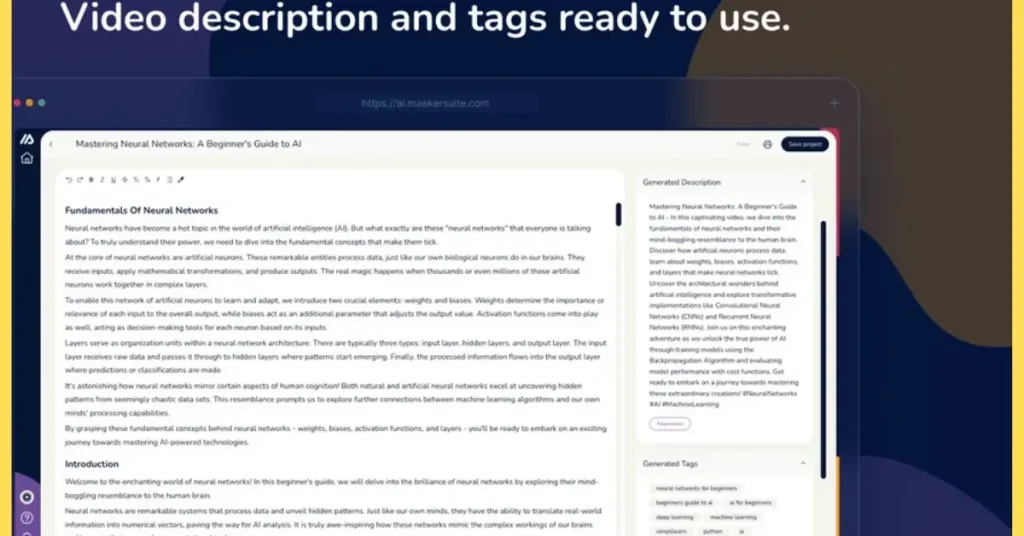
Script and SEO tools transform topic research into an editable first draft before you film.
Which Tier Should You Choose?
The tier you pick depends on your publishing frequency and how deeply you research each video. Tier 1 (15 scripts and 15 explorations per month) works well for a solo creator publishing two to four videos per month who researches each topic thoroughly. Tier 2 (100 of each per month) suits a small agency or a creator posting weekly plus Shorts. Tier 3 is designed for teams producing daily content or managing multiple channels. A practical approach is to start with Tier 1, test it on your next three uploads, and upgrade only if you consistently hit the monthly limits. The same tier logic applies to other lifetime deal purchases: evaluating usage caps upfront prevents paying for capacity you do not need.
2026 Update: AppSumo Deal Availability and What to Check
AppSumo lifetime deals are cyclical by nature: a campaign can sell out, get more codes, or change tier prices without much warning. If you are reading this after the original launch window, the most important step is to check the live Maekersuite AppSumo page for current terms rather than assuming the $69/$169/$329 structure is still active. If the deal has ended, join the waitlist on the product page so AppSumo can notify you if it returns.
Before you buy, check three things: the number of codes left, the stackability policy, and the exact “unlimited AI words” wording. Seeing how another AppSumo deal performed after launch is a useful reminder that one-time pricing does not guarantee a tool stays useful forever—you still need to test the output on your own channel. If you publish videos regularly, the smart move is to grab a Tier 1 license while the deal is still active and test it on your next three uploads.
Maekersuite and YouTube Shorts
Maekersuite works for both regular YouTube videos and Shorts. YouTube Shorts are vertical videos up to 3 minutes long. They are quick and get more engagement. In fact, Shorts get 2.5 times more engagement than longer videos.
YouTube Shorts in Detail
Why People Like YouTube Shorts
Shorts are popular with both viewers and creators. Here's why:
Why Viewers Like Shorts:
Easy to Find: You can see Shorts on the YouTube homepage and the Shorts tab.
Works on Any Device: Watch Shorts on your phone, computer, or TV.
Quick Fun: Shorts offer fun and creative content in a short time.
Why Creators Like Shorts:
Reach More People: Millions of people watch Shorts daily.
Get More Views: Shorts can help bring more viewers to your longer videos.
Make Money: Earn money from ads shown between Shorts.
Maekersuite’s tools, like keyword research and competitor analysis, can help you find popular topics and create engaging Shorts. But we’re not sure which Maekersuite plan works best for Shorts.
For Shorts, the research and keyword features are what matter most: identifying trending topics with low competition and extracting phrases that work in a short, punchy format. The script generator can also produce a 30- to 60-second script tailored to the vertical format. Tier 1 is usually sufficient if you post Shorts alongside longer videos, because the exploration and competitor analysis limits apply to full research sessions rather than to individual Shorts. You can also use the watch-time analysis on your existing Shorts to see which hooks keep viewers watching to the end. For official guidance on Shorts best practices, YouTube provides current formatting and discovery tips that complement what Maekersuite surfaces.
Maekersuite vs. Alternative YouTube Tools
Maekersuite is not the only tool in the YouTube growth space, and the best choice depends on whether you want AI drafting, channel analytics, or bulk management.
Tool Core focus Best for Typical pricing style
Maekersuite AI topic research, script generation, SEO metadata Creators who want a research-to-draft starting point One-time AppSumo lifetime deal or monthly plan
vidIQ Channel analytics, competitor tracking, keyword scores Creators who want data at a glance Monthly subscription with a free tier
TubeBuddy Bulk video management, tag suggestions, thumbnail testing Creators managing a large library Monthly subscription with a free tier
These tools overlap on keyword research, but they are not direct replacements. Maekersuite’s main advantage in a lifetime deal is that you pay once for the drafting layer; the main trade-off is that AI still needs a human editor. For creators who prefer a pure analytics dashboard, a monthly tool that is updated every week can be a better match. Check each vendor’s current pricing, because both feature sets and subscription structures change frequently. You can see the same buying framework applied to a different creative workflow in our creator-focused review.
When you compare tools, keep in mind that YouTube itself is the source of truth for how Shorts and metadata actually affect distribution. For current best practices, we check YouTube’s official Help Center rather than relying on third-party blogs. If you already use a separate analytics tool, Maekersuite can sit alongside it as a dedicated drafting layer rather than replacing your existing workflow.
Maekersuite Company Information
Maekersuite started in July 2020 to make video creation easier. The founders have a background in video production and social media, which gives them insights into what creators need. Their goal is to help creators at all levels with AI-powered tools.
Maekersuite is great for:
YouTubers: Improve your channel with keyword research, scripts, and SEO tools.
Entrepreneurs: Build your brand with easy-to-use video tools.
Content Creators: Overcome creator’s block with research and insights.
Marketers: Make better video content for campaigns.
Educators: Create better educational videos and grow your audience.
Maekersuite plans to add more video platforms and content types in the future.
In practice, that roadmap matters less than how the tool behaves today. The current version is most reliable for YouTube research and drafting; if you need multi-platform publishing now, check whether your actual workflow is covered. The same pattern often appears in our modular SaaS breakdown of similar tools: a strong core feature can justify the price, even when the roadmap is still catching up.
Integrations and Workflow Compatibility
Maekersuite operates as a standalone web application, so it does not directly connect to your YouTube channel, Google Analytics, or editing software. You export scripts and SEO metadata manually, then paste them into your editor and YouTube Studio. This manual step is both a limitation and an advantage: it keeps the tool focused on research and drafting rather than becoming a complex hub. In practice, you can pair it with a dedicated keyword planner for deeper search-volume data or use it alongside a separate channel analytics tool for retention metrics. The manual export also means Maekersuite works with any video editor—Premiere Pro, DaVinci Resolve, Final Cut, or even a basic phone editor—making it a flexible addition to your existing workflow rather than a replacement.
Maekersuite Reviews and User Feedback
Maekersuite has generally received positive feedback from users.
Positive Feedback Negative Feedback
Efficient video research and script generation Occasional errors and limitations in script customization
User-friendly interface Generated scripts can be generic and lack flow
Helpful for market research and content planning Concerns about accuracy for research-heavy content
Identifies trending topics and "outlier" videos
Streamlines content creation process
Helps overcome creator's block
The feedback pattern is consistent with other AI-assisted content tools: users love the time saved on research and first drafts, but they complain when they expect a polished final script. In practice, treat the script output as a strong first draft. You will get better results by feeding it specific direction—your target length, your audience’s skill level, and examples of videos you like—before generating.
Getting the Best Results from Maekersuite
To reduce the generic feel that some users report, invest a few minutes in the setup before generating. Add a short style note at the top of your exploration query: for example, “conversational tone, aimed at beginners, 5-8 minutes.” This signals the AI to match your format. After generating, run the script through a readability check to catch sentences that are too long for spoken delivery. A practical test is to read the script into a voice memo app and listen back—if a sentence feels unnatural to say, rephrase it. Over time, you will build a library of your own preferred phrases and transitions that you can weave into the AI draft, which speeds up the editing process on every subsequent video.
Is Maekersuite Worth It?
Maekersuite helps YouTubers and video creators save time and make better content. The lifetime deal on AppSumo is a good option, especially for those who make videos often.
Still, keep in mind that AI-made content might need some editing to match your style and quality.
If you need help with video research, writing, or optimization, Maekersuite is worth a try.
Who Should Buy the Maekersuite Lifetime Deal?
Maekersuite makes sense if:
You publish YouTube videos at least once or twice a week and need faster research and scripting.
You want a one-time price instead of another monthly subscription.
You are comfortable editing AI-generated text before publishing.
You want to analyse competitor topics without jumping between multiple browser tabs.
You should probably skip it if:
You need a fully automated, publish-ready video pipeline.
Your brand voice is highly specific and requires heavy rewriting of every AI draft.
You prefer a pure analytics dashboard and already have a script-writing process.
Your channel is mainly Shorts with minimal research needs.
The deciding question is whether Maekersuite removes real friction from your workflow. If you spend hours just picking a topic and structuring the video, the deal is easy to justify. If your bottleneck is filming, editing, or thumbnails, a script tool will not change your channel’s trajectory. For a similar decision on a different writing workflow, our AI-assisted writing comparisons show how much output quality can vary between tools.
Final Recommendation
If your weekly routine includes manual topic research and script drafting, Maekersuite can cut that time in half. The lifetime deal removes the subscription pressure, letting you test it at your own pace. Start with Tier 1, apply the workflow tips above, and decide after three videos whether the time savings justify an upgrade. Start your next upload with data-backed topic research rather than a blank page—grab the current deal while it is available and measure the difference in your own editing timeline.
https://www.youtube.com/watch?v=8KGzW2gFFEE&t=7s
Frequently Asked Questions
Q: What are the limitations of "unlimited" AI words?
A: Maekersuite offers "unlimited" AI words, but there are limits to prevent abuse. They may restrict heavy users.
Q: Can I use Maekersuite to write scripts for different videos, like product demos or pitch videos?
A: Yes, Maekersuite can help with product demos, pitch videos, training videos, and more.
Q: How does Maekersuite's AI work?
A: Maekersuite’s AI looks at trending content and competitors to give insights, helping you create videos that fit your audience.
Q: Can I personalize the scripts generated by Maekersuite?
A: Yes! You can change and personalize the scripts to match your brand’s voice.
Q: How do I research videos with Maekersuite?
A: Use the "Explorations" feature. Just type in your keywords, and Maekersuite will give you trending topics and video ideas.
Q: What if I need help with Maekersuite?
A: Contact Maekersuite’s support team or through the in-app chat.
Q: Is Maekersuite good for agencies?
A: Yes, Maekersuite has an Agency plan with higher limits and priority support.
Q: What AI model does Maekersuite use?
A: Maekersuite uses OpenAI GPT-40 for all its tiers.
Q: Can I get a refund if I’m not happy with Maekersuite?
A: Yes, AppSumo offers a 30-day money-back guarantee.
More Maekersuite FAQ (2026)
Q: Is the lifetime deal a one-time payment?
A: Yes, the AppSumo lifetime deal is a one-time payment for the tier you choose. You are not charged monthly unless you later move to a subscription plan off AppSumo.
Q: Can I stack multiple codes?
A: Some AppSumo campaigns allow code stacking, but it is not automatic. Read the deal page’s terms before buying multiple codes.
Q: Does Maekersuite support faceless channels?
A: Yes. The keyword research and script tools work well for faceless channels because they help you batch-produce researched scripts and voiceover copy.
Q: What should I do if the deal has sold out?
A: Join the waitlist on AppSumo or check the Maekersuite site for direct plans. Do not pay a reseller above the original deal price.
Q: Is Maekersuite enough to grow a YouTube channel?
A: No tool guarantees growth. Maekersuite can save time and improve your metadata, but audience growth still depends on your content, thumbnails, retention, and consistency.
Q: Can I use Maekersuite on mobile?
A: Maekersuite is a web app that works best on a desktop browser. While you can access it from a tablet, the full research and script-editing experience is optimised for a larger screen.
Q: Does Maekersuite export directly to YouTube?
A: No, you copy the generated titles, descriptions, tags, and scripts manually and paste them into YouTube Studio or your editing software. This manual step gives you full control over what gets published.
Conclusion
Maekersuite is a useful tool for content creators who want to use AI for video production. It has helpful features, a lifetime deal, and good feedback. But think about the limits and check if it fits your needs.
Maekersuite is great for creators who want to work faster and use data to improve videos. If you need very custom scripts, you may need to spend more time editing. The AI can help speed up the process, but balance automation with creativity to keep your videos real and engaging.

Similar Posts





















[…] Capturing your audience’s attention can be hard. Traditional marketing methods don’t always work. Rhym solves this by adding gamification. With Rhym, businesses can create fun, interactive content that pulls users in and encourages participation. This leads to better engagement, more conversions, and higher sales. Plus, Rhym is easy to add to your existing marketing strategy, with no disruption. For more on this, see our guide on maekersuite lifetime deal review. […]
[…] WP Links is a tool designed to manage and optimize links on your website. It checks all links with one click using a SaaS service. This process doesn't consume your server's resources. WP Links adjusts link attributes for optimal SEO. It also provides customizable warning notifications for external links. For more on this, see our guide on maekersuite lifetime deal review. […]