Shopify vs WooCommerce: Which is Better for Your Online Store in 2026?
Lead SaaS Analyst & Software Developer at PCSaaS · Software Developer (GitHub @Ratankarmakar) · Google Ads & Analytics Certified · 500+ SaaS Tools Tested · 8+ years in software engineering, B2B SaaS evaluation, AppSumo deal auditing, and performance marketing
When it comes to building an eCommerce store, the two most popular platforms that frequently come up are Shopify vs WooCommerce . Both platforms have their strengths and weaknesses, and choosing the best one for your business can be a challenge. In this guide, we’ll compare Shopify vs WooCommerce in terms of ease of use, pricing, features, customization, SEO capabilities, and more. By the end, you’ll have a clearer understanding of which platform is the best fit for your online store.
Introduction
With the rise of online shopping, businesses are looking for ways to create efficient, user-friendly eCommerce stores that can drive sales. Shopify and WooCommerce are two of the most powerful tools available to entrepreneurs, but which one is the right choice for your needs? Whether you are just starting or are already an experienced eCommerce seller, making the right decision is crucial for your business's success.
In this article, we will break down all the essential factors that differentiate Shopify from WooCommerce so that you can make an informed decision and maximize your eCommerce potential.
This guide has been updated for 2026 — the core strengths remain the same, but we’ve added new insights on recent platform changes, hosting requirements, and practical tips that reflect the current landscape.
What is Shopify?
Shopify is a fully hosted, cloud-based eCommerce platform that provides everything you need to set up, run, and grow an online store. Whether you’re selling physical products, digital goods, or services, Shopify offers a comprehensive set of tools to help you manage your business.
Shopify is designed to be user-friendly, making it easy for beginners to create and manage their stores without requiring technical skills. It comes with a variety of themes, apps, and integrations to help you customize your store and scale it as your business grows.
2026 note: Shopify continues to invest in AI‑powered tools like Shopify Magic for product descriptions and Sidekick for store analytics, making it even easier for non‑developers to run a sophisticated store.
In practice, Shopify stores are fastest to launch when you stick to the core feature set. A common mistake is under-budgeting for apps — many merchants end up adding email, loyalty, and inventory apps that cost $10–$30 per month each, so review your likely app stack before choosing a plan.
What is WooCommerce?
WooCommerce is an open-source eCommerce plugin for WordPress. Unlike Shopify, WooCommerce allows you to build a store directly on your existing WordPress site. WooCommerce is highly customizable, offering a wide range of themes and extensions that let you tailor the platform to your specific needs.
Since it’s open-source, WooCommerce gives you full control over your store’s design and functionality. However, it also requires more technical knowledge and hands-on maintenance compared to Shopify.
2026 note: WooCommerce’s core plugin remains free, but the ecosystem has matured with more official extensions and a stronger block‑based editor for custom layouts.
WooCommerce's biggest advantage is ownership. Your content, customer data, and files live on your own hosting account, and the core plugin is maintained by Automattic through the official WooCommerce platform. The trade-off is operational: you handle backups, updates, and security, so set a maintenance schedule before launch.

The two most popular eCommerce platforms, each serving different business needs.
Shopify vs WooCommerce: Ease of Use
Shopify: A Beginner-Friendly Option
When it comes to ease of use, Shopify is hard to beat. Since it’s a fully hosted platform, you don’t have to worry about web hosting, security, or updates. You simply choose a plan, pick a theme, and start adding products. The intuitive drag-and-drop interface makes it easy for anyone to set up and manage a store, even without any coding experience.
In practice, most users can launch a basic Shopify store within an afternoon. The main trade-off is limited design flexibility on lower-tier plans — you may need to purchase a premium theme or hire a developer for deeper customization.
WooCommerce: Requires More Technical Skills
While WooCommerce is relatively easy to install on a WordPress website, it does require a bit more technical know-how. You’ll need to find hosting, install WordPress, configure WooCommerce, and manage regular updates. For users who are familiar with WordPress, this might not be a big deal, but beginners could find the setup process a little overwhelming.
A common mistake is underestimating the initial setup time. Beyond installation, you’ll also need to choose a reliable host, set up caching, and configure a payment gateway. If you already have a WordPress site, WooCommerce is a natural next step — but starting from scratch often takes several days of work.
If you're choosing based purely on effort, Shopify wins on speed to launch, while WooCommerce rewards the extra setup time with much more design freedom. Many merchants start on Shopify to validate an idea and then migrate to WooCommerce once they need custom workflows — the reverse also happens when they outgrow self-hosting responsibilities.
Shopify vs WooCommerce: Pricing
Shopify Pricing
Shopify offers several pricing plans starting at $39/month for the Basic plan, up to $399/month for the Advanced plan. These prices include hosting, SSL certificates, and unlimited bandwidth. Shopify also takes a percentage of your sales, which varies depending on your plan and whether you use Shopify Payments or a third-party payment processor.
While Shopify’s pricing can get expensive as your store grows, it provides a lot of value with its all-in-one service, so you don't have to pay for third-party hosting, apps, or security.
Note that transaction fees drop to 2.4% + 30 ¢ on the Basic plan when using Shopify Payments, but can go as high as 2.9% + 30¢ if you use an external gateway. Budget for apps too — many popular ones (like email marketing or loyalty programs) add $10–$30/month each.
WooCommerce Pricing
WooCommerce itself is free to install, but you’ll still need to pay for web hosting, domain registration, SSL certificates, and other essential tools. Hosting can cost anywhere from $5 to $50 per month , depending on the provider, and you may need to purchase premium themes or plugins for additional features.
The flexibility of WooCommerce’s pricing structure makes it a good option for those on a tight budget, but you may end up spending more if you need additional features.
Hidden costs to anticipate: premium extensions (often $50–$200/year each), developer help for customizations, and security/maintenance services. For a fully featured store, total monthly costs often range from $30 to $100 — comparable to Shopify's mid-tier plans. If you track expenses carefully, reliable accounting software like the options covered in our guide to accounting software for large companies can keep your finances organised.
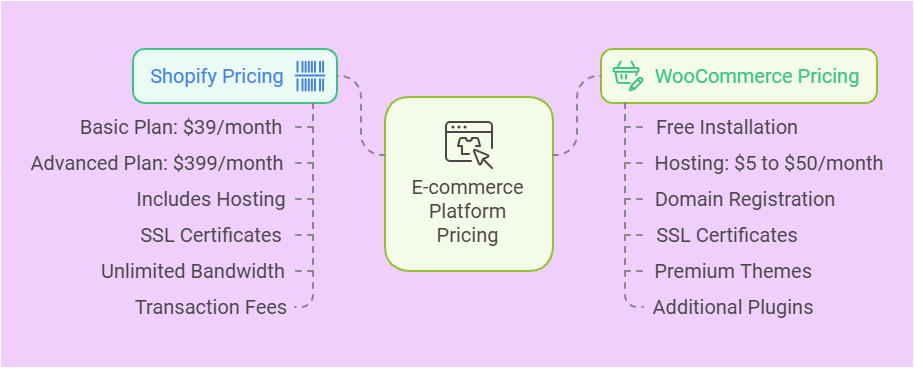
Understanding the pricing differences helps avoid unexpected costs as your store scales.
Shopify vs WooCommerce: Features & Customization
Shopify Features
Shopify offers a wide range of built-in features, including:
Payment Gateway Integration : Shopify Payments, Stripe, PayPal, and many more.
Marketing Tools : SEO optimization, email marketing, social media integrations.
Security : SSL encryption, PCI-compliant payments.
Mobile Optimization : Mobile-ready themes and apps.
App Store : Thousands of apps for additional functionality (inventory management, accounting, customer service).
Shopify's main strength lies in its simplicity and all-in-one approach, but customization can sometimes be limited compared to WooCommerce.
For email marketing, Shopify integrates natively with several providers, but you can also choose from the best email marketing tools for Shopify to match your budget and automation needs.
WooCommerce Features
WooCommerce offers more flexibility and customization options, including:
Full Control Over Design : Custom themes and the ability to tweak the code.
Wide Range of Extensions : Plugins for SEO, shipping, payment gateways, and marketing tools.
Scalability : You can scale your store as needed, adding features and functionality.
Integration with WordPress : Seamless integration with the world's most popular content management system.
WooCommerce is ideal for users who want complete control over their store's look and feel, as well as more customization options.
Because of its open‑source nature, WooCommerce also excels at connecting with third‑party tools. For instance, you can pair it with a dedicated lead‑capture system from our roundup of most reliable saas tools for lead management to streamline your sales funnel.
Shopify vs WooCommerce: SEO Capabilities
Shopify SEO
Shopify offers a range of built-in SEO features such as:
Automatic Sitemap Creation : Easy indexing by search engines.
Editable Meta Tags : Custom title tags, descriptions, and URL structure.
Fast Load Times : Optimized for performance and speed.
Shopify's SEO features are solid, and it provides users with an easy way to optimize their store for search engines without needing advanced SEO knowledge.
A practical tip: use Shopify's built‑in blogging tool to add product‑related content — this helps with long‑tail keyword rankings. For deeper keyword research, integrate with one of the best SEO keyword tools to uncover untapped opportunities.
WooCommerce SEO
WooCommerce, integrated with WordPress, benefits from one of the best SEO ecosystems. WordPress offers advanced SEO plugins like Yoast SEO , which lets you manage meta tags, optimize images, and set custom redirects.
WooCommerce is a better option if you're looking for more SEO customization and control over your website's optimization.
In practice , the ability to create landing pages, category descriptions, and custom post types gives WooCommerce a clear edge for content‑driven stores. However, you'll need to regularly audit site speed and fix crawl errors — tasks that are automated on Shopify.
Both platforms offer strong SEO foundations, but WooCommerce gives you finer control.
Shopify vs WooCommerce: Customer Support
Shopify Support
Shopify offers 24/7 customer support via live chat, email, and phone. Their support team is known for being highly responsive and helpful, making it easy to get assistance if you run into any issues.
In addition to direct support, Shopify's help centre, community forums, and extensive documentation mean most questions are answered quickly. This is a major advantage for store owners who aren't technical and want to avoid fixing problems themselves.
WooCommerce Support
Since WooCommerce is open-source, customer support is less centralized. You can find help through the WordPress forums , paid support from third-party providers, or by hiring a developer. However, this means that if you run into problems, it may take longer to find solutions.
If you run a WooCommerce store and need to delegate routine tasks, consider using virtual assistant tools vs personal assistants for day‑to‑day order management and customer queries — it can free up your time significantly.
Shopify vs WooCommerce: Which is More Secure?
Shopify Security
Shopify is a fully hosted platform, meaning they handle all the security aspects for you. It comes with SSL certificates , PCI compliance , and other security features that help protect customer data and transactions.
WooCommerce Security
With WooCommerce, security is your responsibility. You'll need to set up SSL certificates , update WordPress and WooCommerce regularly, and take precautions against potential vulnerabilities. While WooCommerce itself is secure, it requires more effort on your part to keep everything safe.
A practical step: schedule weekly backups and use a security plugin like Wordfence. For stores handling large transaction volumes, a dedicated hosting provider that includes automatic malware scanning is worth the investment.
Performance, Hosting, and Speed
Site speed directly affects conversion rates and SEO rankings, so it's important to understand how each platform handles performance.
Shopify: Because it's fully hosted, Shopify manages server resources and CDN for you. Load times are consistently fast out of the box, though using too many heavy apps can still slow things down. If you expect high traffic spikes (e.g., Black Friday), Shopify's infrastructure scales automatically.
WooCommerce: Speed depends entirely on your hosting choice. A $5 shared host will likely produce slow load times for a store with more than a few hundred products. Investing in managed WordPress hosting (e.g., WP Engine, Kinsta) or a VPS can bring WooCommerce performance on par with Shopify. Regularly optimise images, use a caching plugin, and keep your plugin count lean.
For a store that relies heavily on custom marketing funnels, you might also explore how clickfunnels integrates with Shopify to combine landing page speed with Shopify's checkout reliability.
Dropshipping and Third‑Party Integrations
Both platforms support dropshipping, but the experience differs.
Shopify: The Oberlo (now Shopify‑owned) app makes dropshipping from AliExpress straightforward. Many other dropshipping apps also offer one‑click product import. The trade‑off is that Shopify's terms of service restrict certain high‑risk dropshipping verticals (e.g., replica goods).
WooCommerce: Plugins like WooDropship or AliDropship give you similar functionality. Because WooCommerce is self‑hosted, you have no restrictions on what you sell — but you also have no built‑in fraud monitoring. You'll need to vet suppliers yourself.
If you plan to use sales funnels alongside your store, a tool like Clickfunnels for e-commerce drive traffic conversion can be integrated with either platform to capture leads and upsell.
2026 Update: Key Changes to Know
Since the original publication date, a few noteworthy developments have occurred:
Shopify's pricing shifted. The Basic plan now includes more features (e.g., enhanced analytics and abandoned cart recovery) that used to be in the Standard plan. Transaction fees for third‑party gateways have also increased by 0.1% on most plans.
WooCommerce's integration with WordPress block editor (Gutenberg) has improved significantly. You can now build product pages and checkouts using blocks, reducing the need for custom code.
AI tools became standard. Both platforms now offer AI‑powered product recommendations, automated customer service chatbots, and predictive inventory management.
Sustainability features are gaining traction. Shopify offers a carbon‑offset program, while WooCommerce has extensions that calculate shipping emissions.
These updates don't change the fundamental choice — Shopify remains simpler, WooCommerce more flexible — but they do affect the total cost of ownership and feature set in 2026.
Choosing Based on Your Business Type
Different business models suit different platforms. Here's a practical breakdown:
Physical products with low complexity (under 100 SKUs) — Shopify is usually the better fit. The all-in-one nature means you can focus on sales rather than server maintenance. Most small-batch makers and artisans find Shopify's curated app store has everything they need.
Digital products and subscriptions — Both platforms work, but WooCommerce gives you more flexibility with membership plugins and licensing tools. For subscription-based digital goods, WooCommerce combined with the right extensions can handle complex recurring billing without monthly per-customer fees.
Content-heavy stores (blogs, reviews, tutorials) — WooCommerce's WordPress foundation makes it the natural choice here. You can combine product pages with rich editorial content, which helps with organic search traffic. Shopify's blogging tool is adequate but less powerful for content marketing strategies.
Multi-brand or multi-store operations — Shopify's organization feature lets you manage multiple stores from one dashboard, while WooCommerce requires separate WordPress installations for each brand. For five or more stores, Shopify's unified backend saves significant administrative overhead.
Enterprise and high-volume stores — Shopify Plus (starting around $2,000/month) offers dedicated infrastructure and API limits for high-growth businesses. WooCommerce can scale to enterprise levels with the right hosting, but you'll need a developer team to manage the infrastructure.
Migration and Future-Proofing
If you're uncertain about which platform to start with, consider the migration path. Many merchants begin on Shopify for its speed of launch, then move to WooCommerce when they need custom functionality that Shopify's walled garden can't provide. The reverse is also common — WooCommerce stores outgrowing self-hosted infrastructure often migrate to Shopify Plus.
Automated migration tools exist for both directions, but expect to rebuild themes during the process — design rarely transfers cleanly. Plan for a few days of downtime and test thoroughly before switching. If you're already using a reliable setup, compare the ongoing costs with property management accounting software to ensure your total overhead stays within budget.
FAQs About Shopify vs WooCommerce
Which is cheaper: Shopify or WooCommerce?
WooCommerce is generally cheaper to start with since the plugin itself is free. However, you'll need to pay for hosting, domains, and additional plugins. Shopify includes hosting and security, but its subscription fees can add up.
Can I scale my store on WooCommerce?
Yes, WooCommerce is highly scalable and can grow with your business. You can add features and functionality through plugins as your needs evolve.
Is Shopify good for SEO?
Yes, Shopify has built-in SEO features, and you can optimize your store with ease. However, WooCommerce offers more advanced SEO customization options.
Do I need technical knowledge to use WooCommerce?
Yes, WooCommerce requires a certain level of technical expertise, especially when it comes to hosting, managing updates, and customizing your site.
Can I use both Shopify and WooCommerce for my store?
You can't use them simultaneously for the same store, but you can consider migrating from one platform to the other as your business evolves.
Which platform is better for beginners?
Shopify is easier for beginners due to its all-in-one setup and lack of technical requirements. WooCommerce may require more learning and setup but offers greater flexibility in the long run.
Can I migrate from Shopify to WooCommerce (or vice versa)?
Yes, migration is common. Automated tools like Cart2Cart can move products, customers, and orders. Expect some downtime and a need to reconfigure themes and apps. Planning the move during a low‑sales period minimises disruption.
Which platform has better built‑in marketing tools?
Shopify includes abandoned cart recovery, discount codes, and email campaigns out of the box. WooCommerce needs extensions for most marketing features, but you can choose from many integrations, including the best email marketing tools for startups to fit your budget.
Do either platform support multi‑currency and multi‑language selling?
Shopify supports multiple currencies via Shopify Payments, and multi‑language stores through third‑party apps or its own Markets feature. WooCommerce can handle multi‑currency with plugins like Aelia, and multi‑language with WPML or Polylang — both require more setup but offer greater control.
How do I choose a hosting provider for WooCommerce?
Look for hosts that specialise in WooCommerce — e.g., SiteGround, Kinsta, or Cloudways. Check for automatic updates, staging environments, and support for PHP 8.x. If you're unsure, compare options with a guide like our best monthly hosting recommendations.
What about tax compliance and reporting?
Shopify automates sales tax calculations in most US states on higher-tier plans. WooCommerce relies on extensions like TaxJar or Avalara for similar functionality. For complex international tax rules, factor in the cost of a dedicated tax plugin — it's a hidden cost that can tip the pricing comparison.
How do backup and restore processes compare?
Shopify automatically backs up your store data, though you can't easily restore individual items — you'd need a third-party backup app. WooCommerce requires you to manage backups manually or through a plugin. Schedule automated daily backups and test restoration at least quarterly to avoid data loss.
Conclusion
Choosing between Shopify and WooCommerce ultimately comes down to your business needs and technical expertise. If you value ease of use, security, and all-in-one features, Shopify may be
the right choice for you. On the other hand, if you prefer full control over customization and are comfortable with WordPress, WooCommerce offers more flexibility and scalability.
Consider the size of your business, your budget, and your long-term goals before making a decision. Both platforms can help you create a successful online store, but one may be more suited to your unique needs than the other.
Next Steps: Choose Your Platform and Start Selling
Ready to launch? Take stock of your technical comfort level, monthly budget, and desired feature set. If you're leaning toward WooCommerce, secure a reliable host and install WordPress first. If Shopify feels like the better fit, sign up for a 14‑day free trial and begin adding products today. Whichever you choose, the most important step is to start — your online store won't build itself.

Similar Posts

















[…] which platform might be right for your online store. check out this detailed comparison of Shopify vs WooCommerce. Understanding these will help you make smarter choices for your e-commerce journey. Keep reading […]
[…] team, allowing you to resolve issues before they become disasters. With integrations like Gmail, Shopify, and Slack, you can customize alerts and status pages to ensure seamless communication and […]