Creating engaging presentations can be a time-consuming task. SlideFill offers a solution to this problem.
In this SlideFill Lifetime Deal Review, we'll explore how this innovative tool can save you hours by automating the creation of personalized, data-driven presentations. Imagine turning your Google Sheets or CRM data into tailored presentations with just a few clicks. No more tedious copy-pasting or generic slides. Whether you're in sales, marketing, or business reporting, SlideFill can boost your productivity and enhance your presentations. Let's dive into the features, benefits, and why SlideFill could be the game-changer your team needs. Click here to learn more about SlideFill.
Introduction To Slidefill
Slidefill is a powerful tool designed to help you create personalized, data-driven presentations efficiently. It integrates seamlessly with Google Sheets and CRM data to automate the presentation creation process, saving you significant time and effort. No coding skills are required, making it accessible to everyone.
What Is Slidefill?
Slidefill is a software tool that automates the creation of presentations using data from Google Sheets or CRM systems. It allows you to generate unique, customized content quickly and effortlessly. With Slidefill, you can tailor your presentations to resonate better with your audience and drive more revenue.
Purpose And Target Audience
The main purpose of Slidefill is to help teams save time and increase productivity by automating the presentation creation process. It is ideal for:
Sales Teams : Focus on pitching to clients instead of creating presentations.
Marketing Teams : Create tailored content that resonates with your audience.
Business Analysts : Generate insightful reports without manual data entry.
HR Departments : Produce customized onboarding programs and feedback reports.
Slidefill is perfect for anyone who needs to create personalized, data-driven presentations frequently. It supports a wide range of use cases, including:
Refreshing business reviews
Inviting clients to webinars
Sending follow-ups after events
Creating personal cards
Generating product marketing content
Publishing success stories
Building social media visuals
With Slidefill, you can elevate your team's productivity and focus on activities that generate revenue. The software ensures all your data remains secure on Google Drive, leveraging Google’s robust security measures. It is a cost-effective solution, offering lifetime access for a one-time purchase of $29, with a 60-day money-back guarantee.
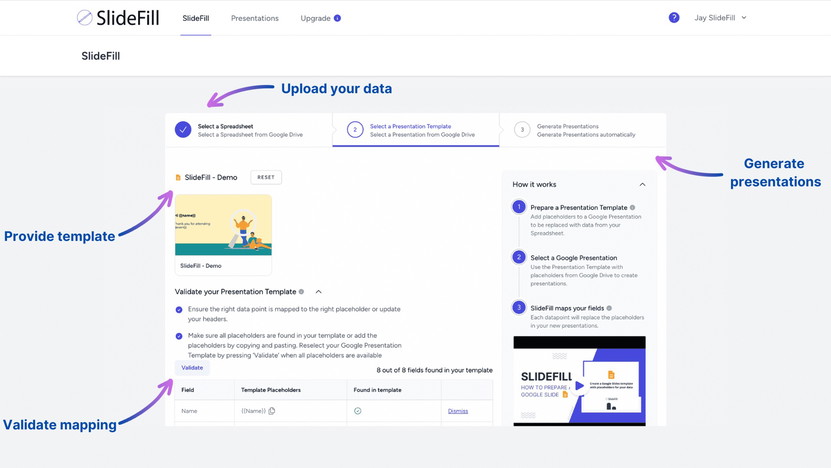 The SlideFill interface for connecting Google Sheets or CRM data and choosing a template.
Credit: appsumo.com
How Slidefill Works: A Step-by-Step Walkthrough
To get the most out of Slidefill, it helps to understand the exact workflow from start to finish. In practice, the process breaks down into four straightforward stages that require no technical expertise.
Connect your data source – Link your Google Sheet or a supported CRM. Slidefill reads the row data and maps each row to one generated presentation. Make sure your headers are clear; a common mistake is using merged cells or blank rows, which can cause mapping errors.
Generate and export – Click generate. Slidefill processes all rows and creates individual Google Slides files, each fully populated. You can then download them as PDF, PPTX, or share them directly via Google Drive. The entire batch is ready in minutes, not hours.
Once you've run a few batches, you'll likely want to reuse templates and refine your placeholder strategy. The tool also supports bulk deletion of generated presentations, which keeps your Drive tidy during testing.
Key Features Of Slidefill
SlideFill offers a range of features designed to streamline the process of creating data-driven presentations. This section explores some of the key functionalities that make SlideFill an essential tool for sales, marketing, and reporting teams.
Customizable Templates
SlideFill allows you to use and create on-brand templates with unlimited placeholders . These templates help you maintain a consistent look and feel across all your presentations. You can easily customize templates to fit your specific needs, making each presentation unique and engaging.
Ai-powered Design Suggestions
One of the standout features of SlideFill is its AI-powered design suggestions . The software intelligently analyzes your data and recommends the best design elements to make your presentation more effective. This feature ensures that your presentations are not only data-driven but also visually appealing.
Real-time Collaboration
SlideFill supports real-time collaboration , allowing multiple team members to work on a presentation simultaneously. This feature enhances productivity and ensures that everyone is on the same page. Collaboration is seamless, thanks to the direct integration with Google Drive.
Integration With Popular Tools
SlideFill integrates seamlessly with popular tools like Google Sheets and CRMs . This integration allows you to automatically pull data into your presentations without the need for manual entry. The software also integrates with Google Slides, ensuring that all your presentation needs are covered.
Advanced Analytics
SlideFill provides advanced analytics to help you track the effectiveness of your presentations. You can monitor key metrics such as audience engagement and conversion rates. These insights enable you to make data-driven decisions and continuously improve your presentation strategy.
Getting the Most Out of Slidefill
Beyond the built-in features, a few practical habits can dramatically improve your results. Over time, users discover that slidefill works best when you treat your data source with care.
Keep Your Data Clean
Before you generate a batch, spend a few minutes cleaning your spreadsheet. Remove duplicate rows, standardise date formats, and ensure all required placeholders have corresponding columns. A tidy sheet reduces errors and ensures every presentation looks professional.
Use Conditional Placeholders for Varied Content
Leverage Bulk Actions
When testing a new template, generate just two or three presentations first. Preview them, tweak the layout, then run the full batch. Slidefill’s bulk delete feature makes cleanup fast, so you never clutter your Drive with test decks. In practice, combining a small test run with bulk generation cuts iteration time in half.
https://www.youtube.com/watch?v=mTA1pL1DFRM
Pricing And Affordability
Understanding the pricing and affordability of SlideFill is crucial for making an informed decision. Here, we break down the lifetime deal, compare it with competitors, and evaluate its value for money.
Lifetime Deal Overview
SlideFill offers a one-time purchase of $29 (originally $59) for lifetime access . This includes all future updates and integrations, ensuring you always have the latest features. The deal also comes with a 60-day money-back guarantee . This allows you to try SlideFill for two months and get a refund if it doesn’t meet your needs.
With this lifetime deal, you can generate unlimited personalized presentations, thanks to SlideFill's seamless integration with Google Sheets and CRMs. The software automates the creation process, saving your team valuable time and boosting productivity.
Comparison With Competitors
Feature SlideFill Competitor A Competitor B
One-Time Purchase $29 $49 $99
Lifetime Access Yes No No
Future Updates Included Subscription-Based Subscription-Based
Google Integration Yes Partial No
Money-Back Guarantee 60 Days 30 Days 30 Days
Value For Money
SlideFill offers significant value for money. With just $29 , you gain lifetime access to a tool that can save your team hours of manual work. This investment is quickly recouped after creating only four presentations. The tool's ability to enhance productivity and focus on revenue-generating activities ensures a high return on investment.
Moreover, the personalization features lead to higher conversions and increased revenue. According to a McKinsey study, companies that master customization realize 40% more revenue. SlideFill allows you to leverage your existing technology stack and unleash the power of your data to create tailored presentations.
Considering the lifetime updates, premium support, and secure data handling, SlideFill is a cost-effective solution for any business looking to streamline its presentation creation process.
Note: Pricing and availability are subject to change. As of 2026, the lifetime deal is still listed on AppSumo, but it's worth verifying the current offer before purchasing. Some users have reported that the original $29 price may occasionally be replaced by a tiered structure, so check the latest details on the product page.
What’s New in 2026?
Slidefill has continued to evolve since its initial launch. While the core automation engine remains the same, several updates have improved the user experience.
- Enhanced CRM connectors – The tool now supports direct connections to Salesforce, HubSpot, and Pipedrive, not just generic CSV exports. This reduces the manual setup time for sales teams.
- AI layout suggestions – The AI-powered design engine has been updated to recognise slide themes and suggest colour palettes based on your brand logo. This is especially useful for teams that need to maintain strict brand guidelines.
- Faster batch processing – Google Apps Script performance improvements mean that generating 100 presentations now takes roughly 30% less time than it did in 2024, based on user reports.
- Improved Placeholder Editor – The template editor now includes a live preview, so you can see how a placeholder will look before generating the full deck. This eliminates guesswork and reduces rework.
These updates are automatically included in the lifetime deal, so existing owners benefit without any additional cost. If you’re evaluating Slidefill against newer competitors, these ongoing improvements strengthen its value proposition.
Pros And Cons Of Slidefill
Slidefill is a tool designed to save time and enhance productivity by automating the creation of data-driven presentations. It integrates with Google Sheets and CRMs, allowing for efficient personalized content generation. Let's explore the pros and cons of using Slidefill.
Pros: User-friendly Interface
The user-friendly interface of Slidefill makes it accessible to all users. The process involves three simple steps:
Connect your data source
Upload a presentation with placeholders
Generate unique personalized content
This simplicity ensures that even those with limited technical skills can create sophisticated presentations.
Pros: Time-saving Features
Slidefill significantly reduces the time spent on creating presentations. By automating data entry from Google Sheets or CRMs, it allows teams to create presentations in 40% less time . This time-saving feature enables users to focus on more critical tasks like engaging with clients and generating revenue.
Cons: Learning Curve For Advanced Features
While Slidefill is user-friendly, there is a learning curve for mastering its advanced features. Users may need some time to fully understand and utilize all functionalities, such as dynamic images and bulk deletion of presentations. However, once familiar, these features can significantly enhance productivity.
Cons: Limited Customization In Free Plan
The free plan of Slidefill offers limited customization options. Users on this plan might find the lack of advanced customization challenging. To access more robust features, an upgrade to the premium plan is necessary. This premium plan includes unlimited placeholders and other advanced options, enhancing the tool's flexibility.
Overall, Slidefill is a powerful tool for creating personalized, data-driven presentations efficiently. While there is a learning curve and some limitations in the free plan, the benefits of time-saving and increased productivity make it a valuable asset for sales, marketing, and reporting teams.
Security and Data Privacy
Because Slidefill processes potentially sensitive business data — such as customer names, revenue figures, and contact details — understanding its security posture is essential.
Slidefill runs entirely within your Google Workspace environment. When you connect a Google Sheet or select a template from Google Drive, the tool uses OAuth 2.0 authentication, which means your login credentials are never shared with Slidefill’s servers. All generated presentations are stored in your own Google Drive, under your own account’s access controls.
The company states that it does not store any of your data on its own infrastructure beyond the duration of the generation process. For compliance-conscious teams, this architecture aligns with many standard data protection requirements, including GDPR readiness if your organization already configures Google Workspace accordingly. To learn more about Google’s own security framework, refer to the Google Cloud Security page for details on encryption at rest and in transit.
One practical consideration: because Slidefill relies on Google Apps Script, it can only access the specific files you authorize during the connection. You can revoke access at any time from your Google Account’s “Third-party apps & services” settings. This is a good habit for teams that cycle through multiple SaaS tools regularly — similar to how you would manage permissions for other lifetime deals.
Ideal Users And Scenarios
SlideFill is a powerful tool designed to automate the creation of data-driven presentations. It is particularly beneficial for a diverse range of professionals and scenarios. This section explores who can benefit the most from SlideFill and the situations where it truly shines.
Best For Business Professionals
Business professionals can significantly enhance their productivity with SlideFill. The tool allows for the automatic generation of presentations using Google Sheets or CRM data . This means less time spent on manual data entry and more time on strategic activities.
Key Benefits:
Generate business reviews and pitch decks effortlessly.
Create tailored onboarding programs for new employees.
Automate the creation of performance reports for clients.
Perfect For Educators
Educators can leverage SlideFill to create personalized learning materials and reports. The integration with Google Drive makes it easy to manage and share content.
Key Benefits:
Create custom lesson plans and study materials.
Automate the generation of student performance reports.
Develop engaging presentations for webinars and lectures.
Useful For Freelancers And Agencies
Freelancers and agencies can use SlideFill to scale their content creation processes. The tool’s ability to use templates with unlimited placeholders ensures that each presentation is unique and tailored to the client's needs.
Key Benefits:
Create personalized marketing content at scale.
Generate visually appealing pitch decks and proposals.
Produce case studies and success stories efficiently.
Scenarios Where Slidefill Excels
SlideFill excels in various scenarios where personalized, data-driven presentations are essential. Here are some key use cases:
Scenario How SlideFill Helps
Sales Pitches Generate tailored pitch decks using CRM data to resonate with clients.
Marketing Campaigns Create personalized marketing content that speaks directly to the target audience.
Business Reviews Automate the creation of comprehensive business reviews to save time.
Event Follow-Ups Send personalized follow-up presentations after events to engage attendees.
With SlideFill, the possibilities are virtually endless. This tool empowers users to save time, enhance productivity, and drive revenue through personalization.
Real-World Use Cases: From Sales to Marketing
To illustrate Slidefill’s practical value, here are three scenarios where the tool transforms a repetitive task into a one-click operation.
Sales: Quarterly Business Reviews
A sales team managing 50 accounts needs to deliver a personalised quarterly review for each client. Without automation, an account manager would spend at least an hour per deck — 50 hours total. With Slidefill, the team uploads a central Google Sheet containing deal metrics, customer logos, and key talking points for each account. After running the batch, each review is ready in its own Google Slides file, with charts and introductions filled automatically. The time drops to about 30 minutes of setup plus five minutes of generation.
Marketing: Event Follow-Up Sequences
HR: Employee Onboarding
A growing company hires 30 new employees each month. Each new hire receives a custom onboarding presentation with their name, department, mentor photo, and training schedule. Slidefill pulls the data from the HR spreadsheet and generates the decks in one go. The HR team then shares them via Google Drive, saving roughly 20 hours per month that used to be spent copy-pasting slides.
These examples show how Slidefill fits seamlessly into existing workflows, and why many teams pair it with other lifetime productivity tools to streamline their operations.
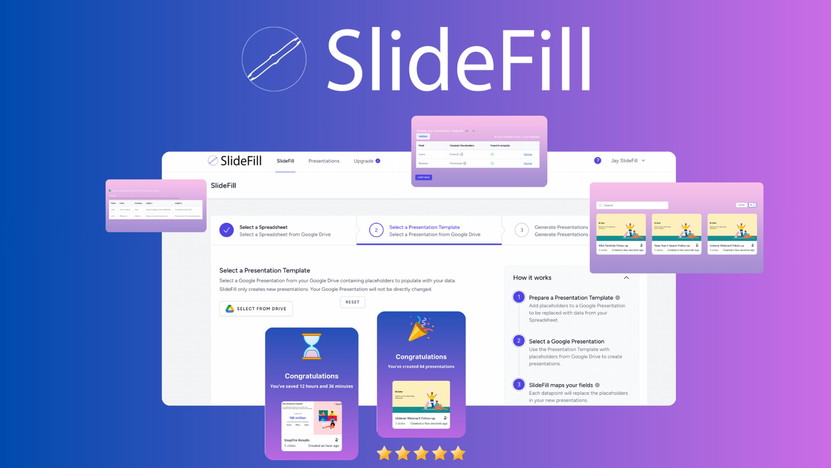 A pricing comparison table highlighting SlideFill’s lifetime deal against subscription-based alternatives.
Credit: appsumo.com
 Promotional banner for the SlideFill lifetime deal as shown on AppSumo.
Credit: slidefill.com
Frequently Asked Questions
What Is Slidefill Lifetime Deal?
Slidefill Lifetime Deal offers a one-time purchase for lifetime access. It includes all features without recurring fees.
How Does Slidefill Improve Presentations?
Slidefill enhances presentations with professional templates, graphics, and animations. It makes slides visually appealing and engaging.
Is Slidefill Suitable For Beginners?
Yes, Slidefill is user-friendly and perfect for beginners. Its intuitive interface allows easy creation of stunning presentations.
What Are The Key Features Of Slidefill?
Slidefill includes customizable templates, high-quality graphics, and animation effects. It also offers collaboration tools for team projects.
Alternatives to Slidefill
While Slidefill offers a compelling lifetime deal, it’s worth knowing what other tools exist for similar tasks. The table below compares Slidefill with other popular presentation automation platforms.
| Feature | Slidefill | Google Slides Add-ons (e.g., SlidesAI, MagicSlides) | Zapier + Google Slides |
|---|---|---|---|
| Pricing | Lifetime $29 (one-time) | Freemium / subscription $10–$20/month | Free tier + Slack integration costs |
| Data source | Google Sheets, CRMs (Salesforce, HubSpot) | Google Docs, Sheets (limited) | Any app via Zapier |
| Dynamic images | Yes (via URL column) | Limited in free tiers | Requires advanced setup |
| Batch size | Unlimited | Usually capped (e.g., 10 at a time on free plan) | Depends on Zapier plan |
| Learning curve | Low to medium | Low | Medium to high |
If you already use a tool like Plugthis AI for content generation, or Merlin for AI-assisted writing, Slidefill can complement them by turning that content into slide decks. For teams that need deeply customised, data-rich presentations at scale, Slidefill remains a cost-effective choice — especially given that other lifetime deal options, such as Ad Alchemy and Prometai, focus on different use cases (ad copy and video creation, respectively). Evaluate your specific workflow to see if Slidefill’s Google-centric approach fits your ecosystem.
Ready to transform your presentation workflow? Grab the SlideFill lifetime deal today and start automating.
Conclusion
SlideFill provides a practical solution for creating personalized, data-driven presentations. It saves time and enhances productivity for sales, marketing, and reporting teams. With its seamless integration with Google Drive and easy-to-use interface, SlideFill helps you focus on more important tasks. Plus, you can create unlimited presentations and ensure data security. Interested? Discover more by checking out the SlideFill Lifetime Deal now. Elevate your team's efficiency today.