What is the Cloud? A Complete Guide to Servers, Storage & Apps
Lead SaaS Analyst & Software Developer at PCSaaS · Software Developer (GitHub @Ratankarmakar) · Google Ads & Analytics Certified · 500+ SaaS Tools Tested · 8+ years in software engineering, B2B SaaS evaluation, AppSumo deal auditing, and performance marketing
What is the Cloud? A Complete Guide to Servers, Storage & Apps
What is the Cloud? It’s a technology that stores and accesses data over the internet instead of local devices, enabling remote access and flexible computing.
But what exactly is the cloud, and how does it affect your daily life and business? Understanding the cloud isn’t just for tech experts—it’s for you too. Whether you want to keep your personal data safe, access your work from anywhere, or save money on expensive hardware, knowing what the cloud is can open doors to new possibilities. Imagine being able to reach your important files anytime, from any device, without carrying around a bulky hard drive. Or think about how your small business could grow faster by using powerful tools without the headache of managing complicated servers. That’s the power of the cloud, and it’s easier to grasp than you might think.
Understanding The Cloud: A Modern Computing Revolution
The cloud has changed how people and businesses use technology. It allows access to files and apps from any device with internet. This shift makes computing easier, faster, and often cheaper. The cloud moves work from local machines to powerful servers located worldwide. It supports daily tasks for millions of users and companies, shaping modern computing.
As of 2026, cloud computing has become the backbone of most digital services, with serverless architectures and AI integration driving further innovation. Businesses of all sizes now rely on cloud platforms to run everything from email to complex machine learning models.
Defining The Cloud: What Exactly Is It?
The cloud means servers accessed over the internet . These servers host software, databases, and services. They live in data centers spread around the world.
Users do not need their own physical servers or install software locally. Instead, cloud servers handle storage and computing.
Access files from any device
Run applications without local installation
Store data safely in remote data centers
This setup allows instant access to email, photos, documents, and more. Services like Gmail, Dropbox, and Microsoft Office 365 run on the cloud.
A practical way to think about the cloud is as a utility: you consume computing resources the same way you use electricity — you pay for what you use without owning the power plant. This model eliminates the burden of hardware maintenance and lets you focus on your actual work.
The Origin Of 'the Cloud' Term Explained
The term "the cloud" comes from network diagrams. Designers drew the internet and complex networks as a cloud shape. This simplified showing where data and computing happen.
People began calling remote servers and services “the cloud” because of this visual. The cloud represents a large, invisible network of computers working together.
How The Cloud Differs From Traditional Computing
| Aspect | Traditional Computing | Cloud Computing |
|---|---|---|
| Location | On local computers or servers | On remote servers accessed via internet |
| Maintenance | User or company manages hardware and software | Cloud provider handles updates and hardware |
| Cost | High upfront costs for hardware and software | Pay-as-you-go pricing, lower upfront cost |
| Accessibility | Limited to specific devices or networks | Accessible from almost any device worldwide |
| Scalability | Adding capacity requires new hardware | Scale up or down quickly with cloud resources |
The cloud removes the need for owning and managing physical servers. It offers flexible, cost-effective computing power and storage. This flexibility helps small businesses and large enterprises run smoothly.
Key Features That Make The Cloud Unique And Valuable
The cloud offers several features that set it apart from traditional computing. These features deliver flexibility, ease of use, and cost savings. They help businesses and users adapt to changing needs quickly and efficiently. Understanding these key features reveals why the cloud is a valuable resource today.
Scalability And Elasticity: Growing With Your Needs
Scalability means the cloud can handle growing amounts of work. It allows businesses to add resources when demand rises. Elasticity lets users increase or decrease resources instantly.
Expand storage and processing power without buying hardware
Adapt quickly to user demand changes
Pay only for what you use
This flexibility helps businesses stay agile and avoid wasted expenses.
On-demand Self-service: Instant Access And Control
The cloud provides instant access to computing resources. Users can manage servers, storage, and applications anytime. No need to wait for IT support or manual setup.
Launch virtual machines with a few clicks
Control software and data remotely
Manage resources through simple web interfaces
This ease of control speeds up workflows and improves productivity.
Global Network Of Remote Servers: Accessibility Anywhere
The cloud runs on a global network of servers in data centers worldwide. This network makes data and apps accessible from almost any device or location.
| Benefit | Description |
|---|---|
| Access from Multiple Devices | Use the same files and apps on phones, tablets, or PCs |
| Work from Anywhere | Connect to your data even while traveling or at home |
| Reliable Performance | Data centers ensure fast and stable connections |
Cost-efficiency Through Pay-as-you-go Models
The cloud offers pay-as-you-go pricing . Users pay only for the resources they consume. This model reduces upfront costs and lowers financial risk.
No need to buy expensive hardware
Lower IT maintenance expenses
Flexible budgeting based on actual use
This approach suits small businesses and startups with limited budgets.
Enhanced Data Storage And Backup Solutions
The cloud provides secure and scalable storage options. Data backup happens automatically to prevent loss.
Store large amounts of data safely
Automatic backups protect against hardware failure
Easy data recovery and sharing
These features increase data security and peace of mind.
A common mistake is relying on a single backup copy. In practice, implement a 3-2-1 backup strategy: keep three copies of your data, on two different media, with one copy off-site in the cloud. This ensures redundancy even if one provider experiences an outage. Many website owners also set up automated cloud backups to protect their content and databases.
Pricing And Affordability: Understanding Cloud Costs
Cloud computing offers many financial benefits. Understanding cloud costs helps businesses plan better and avoid surprises. Pricing varies by provider and usage. It depends on services, resources, and payment models. This section breaks down common pricing models, how pay-as-you-go helps users, comparisons with on-premise costs, and budgeting tips for cloud adoption.
Overview Of Common Cloud Pricing Models
Cloud providers offer different pricing models. Knowing these helps choose the best fit for any business or project.
| Pricing Model | Description | Best For |
|---|---|---|
| Pay-As-You-Go | Pay only for the resources used, billed per second or hour. | Startups, variable workloads, short-term projects. |
| Reserved Instances | Pre-pay for resources over a fixed term at a discounted rate. | Long-term, steady workloads needing cost predictability. |
| Spot Instances | Use spare cloud capacity at lower prices but with interruptions. | Flexible tasks, batch processing, fault-tolerant jobs. |
| Free Tier | Limited resources free for new users or small projects. | Learning, testing, small apps. |
How Pay-as-you-go Benefits Different Users
Pay-as-you-go charges only for actual usage. There are no upfront costs or long contracts.
Startups can test ideas without big investments.
Developers scale resources up or down easily.
Businesses avoid paying for unused capacity.
This model offers flexibility and control. Users can track costs in real time. Sudden changes in demand do not cause overspending.
Comparing Cloud Costs To On-premise Infrastructure
On-premise infrastructure means buying and managing physical servers and equipment. Cloud computing removes this need.
| Cost Factor | On-Premise | Cloud |
|---|---|---|
| Initial Investment | High – buying hardware and setup | Low – pay for what you use |
| Maintenance | Ongoing IT staff and upgrades | Included in service fees |
| Scalability | Slow and costly to expand | Instant and flexible scaling |
| Downtime Costs | High if hardware fails | Cloud providers offer redundancy |
Cloud reduces upfront costs and offers easier scaling. It shifts expenses from capital expenditure to operational expenditure.
Budgeting Tips For Cloud Adoption
Estimate Usage: Predict storage, compute, and bandwidth needs.
Choose Pricing Models: Match models to workload patterns.
Monitor Spending: Use cloud cost management tools regularly.
Set Alerts: Get notified of unusual cost spikes.
Optimize Resources: Turn off unused services and rightsizing instances.
Review Contracts: Understand terms before committing to reserved plans.
Exploring productivity software at reduced rates can help small teams stretch their cloud budget further, especially when paired with usage-based pricing.
Clear budgets prevent overspending. Regular reviews keep cloud costs aligned with business needs.
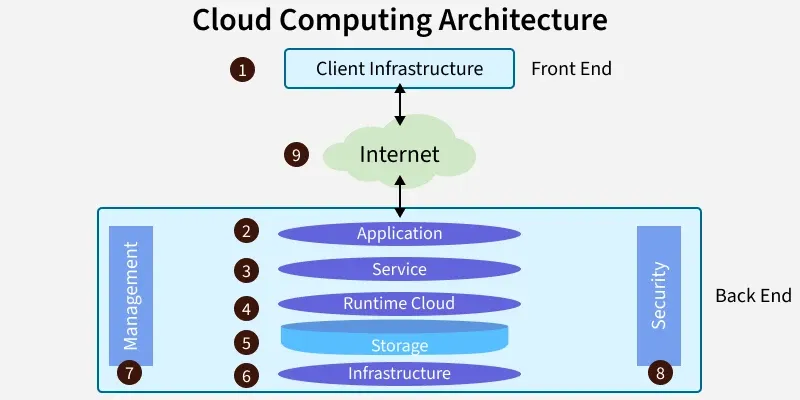
 Diagram comparing cloud computing architecture with distributed computing.
Credit: www.projectpro.io
Pros And Cons Of Using The Cloud Based On Real-world Usage
The cloud offers many benefits but also some challenges. Real-world users find both advantages and drawbacks in cloud computing. Understanding these helps decide if the cloud fits your needs. Let’s explore the key points based on actual experiences.
Advantages: Flexibility, Accessibility, And Reliability
Flexibility is one of the biggest benefits of the cloud. Users can scale resources up or down based on demand. This means no need to buy or maintain extra hardware.
Accessibility allows users to reach files and applications from almost any device. Cloud servers store data centrally, so users get the same experience on phones, laptops, or tablets.
Reliability comes from the cloud provider’s data centers spread worldwide. This setup reduces downtime and protects data through backups and failover systems.
Access work from home or on the go
Automatic software updates managed by providers
Easy collaboration across teams and locations
Challenges: Security Concerns And Internet Dependence
Security is a common worry. Data stored in the cloud may seem vulnerable to breaches or hacks. Users must trust the provider’s security measures.
Internet dependence means no cloud access without a stable connection. Slow or unreliable internet can disrupt work or cause delays.
| Challenge | Description | Impact |
|---|---|---|
| Security Concerns | Risks of data breaches and unauthorized access | Potential data loss or privacy issues |
| Internet Dependence | Requires continuous internet connection | Work stoppage if connection fails |
An often-overlooked trade-off is vendor lock-in: migrating away from a single provider can be costly and complex. In practice, many organizations adopt a multi-cloud strategy to spread risk and maintain negotiating power.
Common Misconceptions About Cloud Computing
Many think the cloud is just online storage. It is much more; it includes servers, software, and databases running remotely.
Another myth is that the cloud is always expensive. Actually, it can save money by cutting costs for hardware and IT staff.
Some believe cloud data is less secure than local data. But cloud providers invest heavily in security and compliance.
A further misconception is that the cloud is a single entity. In reality, there are multiple deployment models — public, private, and hybrid — each suited to different needs and compliance requirements. Understanding these distinctions helps avoid lock-in and ensures the right fit for your workload.
How Users Overcome Cloud Limitations
Users improve security by enabling strong passwords and two-factor authentication. Encryption tools add extra protection.
To reduce internet issues, some keep local backups or use hybrid cloud setups combining cloud and local storage.
Choosing reputable cloud providers with solid support helps solve many challenges quickly.
Use security best practices to protect data
Maintain offline copies of critical files
Pick providers with good uptime and customer service
For instance, setting up cost alerts in your cloud provider’s dashboard prevents surprising bills. Many users also adopt a multi-cloud strategy, spreading workloads across providers to avoid dependency on a single vendor. Following federal cloud security standards can further strengthen your data protection posture.
Who Should Use The Cloud? Ideal Users And Use Cases
The cloud serves a wide range of users by offering flexibility, cost savings, and easy access. Different groups benefit from cloud computing in unique ways. Understanding these ideal users helps to see how the cloud fits into daily work and life.
Small Businesses And Startups: Leveraging Low-cost Infrastructure
Small businesses and startups often have limited budgets for IT. The cloud offers affordable infrastructure without large upfront costs. Companies can rent computing power, storage, and software as needed.
No need to buy expensive servers
Pay only for what is used
Quickly scale resources as business grows
Easy access to latest software without manual updates
This model reduces IT overhead and allows small teams to focus on core business activities.
Integrating social media management tools into your cloud workflow can help you schedule posts, track engagement, and manage multiple accounts from a single dashboard — all without local software.
Enterprises Needing Scalable Resources And Disaster Recovery
Large enterprises require vast computing power and reliable backup solutions. Cloud services provide scalable resources that adjust to demand peaks.
| Use Case | Cloud Benefit |
|---|---|
| Handling traffic spikes | Automatically add servers to handle load |
| Disaster recovery | Data backup across multiple data centers worldwide |
| Global collaboration | Access from any location, any device |
Cloud ensures business continuity and reduces downtime risks.
Individual Users: Simplified File Storage And Access
Individual users enjoy the cloud for easy file storage and access . Files saved in the cloud can be reached from phones, tablets, or computers.
Photos and videos stay safe even if device breaks
Work documents accessible anywhere
Automatic syncing across devices
Sharing files with friends or colleagues with simple links
The cloud removes the need to carry physical storage devices.
Developers And It Professionals: Flexible Testing And Deployment Environments
Developers use the cloud to build and test software in flexible environments . IT teams deploy applications faster without managing physical hardware.
Create multiple virtual servers in minutes
Test different software versions safely
Deploy updates globally with minimal downtime
Automate scaling and monitoring
This flexibility speeds up development cycles and reduces costs.
Low-code and rapid development platforms allow teams to prototype and iterate quickly, reducing the time from idea to production.
 Thumbnail of a popular cloud computing explainer video on YouTube.
Credit: www.youtube.com
Unlocking The Cloud’s Benefits Today: Practical Tips
The cloud offers many advantages for businesses and individuals. Using cloud services can lower costs, improve access, and boost productivity. This section shares practical tips to help you make the most of the cloud. Follow these guidelines to select the best services, protect your data, enhance work efficiency, and prepare your organization for smooth cloud adoption.
Choosing The Right Cloud Service Provider
Selecting a cloud provider is a key step. Consider these factors:
Reliability: Look for providers with strong uptime records.
Support: Choose vendors that offer 24/7 customer service.
Pricing: Compare costs and billing models to fit your budget.
Scalability: Ensure the provider can grow with your needs.
Compliance: Confirm they meet industry security and data rules.
Best Practices For Data Security In The Cloud
Protecting data in the cloud is critical. Use these best practices:
Encrypt data before uploading it to the cloud.
Use strong passwords and enable multi-factor authentication.
Regularly back up important information.
Set clear access controls and limit permissions.
Monitor activity logs to detect unusual actions.
Maximizing Productivity With Cloud-based Tools
Cloud tools help teams work better together. Key benefits include:
Access files anytime, from any device.
Real-time collaboration on documents and projects.
Automatic updates that keep software current.
Integration with other apps for smoother workflows.
Popular cloud apps include Microsoft Office 365, Google Workspace, and Dropbox.
A professional video editing suite is another example of a cloud-enabled tool that lets creators work from anywhere without powerful local hardware.
Preparing Your Organization For Cloud Migration
Prepare your team and systems before moving to the cloud:
Assess current IT infrastructure and identify needs.
Train staff on cloud tools and security practices.
Plan data migration carefully to avoid loss.
Test cloud services with a pilot project first.
Set clear goals and timelines for the transition.
Ready to move to the cloud? Begin with a free trial of a major provider to test the waters and evaluate real-world performance before committing long-term.
 Infographic outlining key stages of a successful cloud migration project.
Credit: www.knowledgehut.com
Types of Cloud Deployment and Service Models
Choosing the right cloud environment depends on your security needs, budget, and operational requirements. Cloud deployments fall into three main categories, and services are typically delivered through three distinct models.
Public, Private, and Hybrid Cloud
A public cloud is owned by a third‑party provider and shared across multiple tenants — ideal for scalability and low cost. A private cloud is dedicated to a single organization, offering greater control and compliance. A hybrid cloud combines both, allowing data and applications to move between them.
| Deployment | Key Advantage | Common Use Case |
|---|---|---|
| Public Cloud | Low upfront cost, immediate scalability | Web apps, dev/test environments |
| Private Cloud | High security and customization | Regulated industries, financial services |
| Hybrid Cloud | Flexibility to keep sensitive data on‑premises while using public cloud for burst capacity | Disaster recovery, seasonal workloads |
Infrastructure, Platform, and Software as a Service
These three service models define what you manage versus what the provider handles:
- IaaS (Infrastructure as a Service) – You rent virtual servers, storage, and networking. You manage the OS, middleware, and applications. (e.g., Amazon EC2, Google Compute Engine)
- PaaS (Platform as a Service) – The provider manages the runtime environment, databases, and middleware. You focus on writing and deploying code. (e.g., Google App Engine, Heroku)
- SaaS (Software as a Service) – The provider delivers a complete application accessible via browser. You just use it. (e.g., Gmail, Salesforce)
Understanding these models helps you match the right level of abstraction to your team’s skills and operational overhead. For example, many startups start with SaaS for productivity and later adopt PaaS when they need custom logic.
Frequently Asked Questions
What Is The Cloud In Simple Terms?
The cloud is a network of remote servers accessed online to store, manage, and process data for users and devices instantly.
What Is The Cloud For Dummies?
The cloud is a network of remote servers on the internet that store, manage, and process data. It lets users access files anytime, anywhere without local storage. The cloud supports apps, backups, and sharing securely and efficiently. It simplifies data handling for individuals and businesses.
What Is The Cloud And Do I Need It?
The cloud is a network of remote servers storing and managing data online. Use it to access files anytime, anywhere. It boosts storage, collaboration, and security without local hardware. Businesses and individuals benefit from its flexibility and scalability. Choose the cloud if you want easy, reliable data access.
Why Is The Internet Called The Cloud?
The internet is called the cloud because early tech diagrams used a cloud symbol to represent complex networks. It stores and processes data remotely, making access easy and flexible.
What is the difference between public, private, and hybrid cloud?
A public cloud is shared across multiple customers, a private cloud is dedicated to one organization, and a hybrid cloud mixes both to balance cost and control. Each type addresses different security and scalability needs.
What are IaaS, PaaS, and SaaS?
IaaS provides virtualized computing resources, PaaS delivers a platform for developing and deploying applications, and SaaS offers ready‑to‑use software over the internet. The less you manage, the faster you can focus on your core business.
How does cloud computing support AI and machine learning?
Cloud platforms provide the massive compute power and storage required to train large models, along with pre‑built AI services for tasks like image recognition, natural language processing, and predictive analytics. In 2026, most AI workloads run on cloud infrastructure.
Conclusion
The cloud offers easy access to data and applications anytime, anywhere. It helps businesses save money by removing the need for physical servers. Users can work from different devices without losing their information. Cloud computing supports both small and large companies with flexible solutions. To learn more about cloud hosting options, visit best cloud hosting for small business. Embracing the cloud means simpler technology and greater convenience for everyone.

Similar Posts