Types of Cloud Computing: Essential Models You Must Know
Lead SaaS Analyst at PCSaaS · Software Developer · 500+ Tools Tested · Google Ads & Analytics Certified · 8+ Years Experience
Cloud computing delivers computing services like servers, storage and software over the internet instead of local machines. This guide explains the three service models — IaaS, PaaS and SaaS — plus the four deployment models: public, private, hybrid and community cloud, with examples of each.
Types of cloud computing include public, private, and hybrid models, each offering different ways to access and manage computing resources over the internet.
Whether you want to save costs, improve flexibility, or scale your operations quickly, knowing which cloud model suits your needs will make all the difference. You'll discover the main cloud service models like IaaS, PaaS, SaaS, and even serverless computing. Plus, we'll explore various deployment options such as public, private, hybrid, community, and multicloud setups. Ready to find out which cloud computing type is right for you? Dive in and get the clarity you need to make smarter, faster decisions. For more on this, see our guide on samsung 990 pro review.
Introduction To Cloud Computing Models
Cloud computing models define how computing resources are delivered and managed. These models shape how businesses use cloud technology to meet their needs. Understanding these models helps in choosing the right cloud setup.
Overview Of Cloud Computing And Its Importance
Cloud computing delivers servers, storage, databases, and software over the internet. This removes the need for physical hardware onsite.
It enables companies to:
Access data and apps anytime, anywhere
Scale resources up or down easily
Reduce costs linked to owning hardware
Three main Cloud Service Models exist:
Infrastructure as a Service (IaaS) : Rent virtual machines and storage.
Platform as a Service (PaaS) : Use platforms to build and deploy apps.
Software as a Service (SaaS) : Access software via the internet.
Deployment types include Public, Private, Hybrid, Community , and Multi-cloud . Each type suits different business needs.
According to the official cloud architecture specifications established by the National Institute of Standards and Technology, cloud computing fundamentally relies on five essential characteristics: on-demand self-service, broad network access, resource pooling, rapid elasticity, and measured service. Understanding these foundational traits helps IT leaders distinguish genuine cloud environments from basic remote hosting.
Why Understanding Different Cloud Models Matters
Choosing the correct cloud model impacts:
Security : Private clouds offer more control.
Cost : Public clouds can be more affordable.
Flexibility : Hybrid clouds combine benefits of public and private.
Performance : Models affect speed and reliability.
Knowing the differences helps avoid:
Overpaying for unused services
Security risks from wrong deployment
Complex management issues
Cloud Deployment Model Description Best For
Public Cloud Resources shared over the internet, managed by providers. Startups, variable workloads
Private Cloud Dedicated infrastructure for a single organization. Businesses needing high security
Hybrid Cloud Combination of public and private clouds. Companies requiring flexibility
Community Cloud Shared cloud among organizations with common goals. Groups with similar security needs
Multi-cloud Use of multiple cloud services from different providers. Businesses wanting to avoid vendor lock-in
Types Of Cloud Computing Deployment Models
Cloud computing offers various deployment models to meet different business needs. Each model differs in access, security, and control. Understanding these models helps businesses choose the right cloud strategy.
Public Cloud: Accessibility And Cost Benefits
The Public Cloud is a cloud service offered by third-party providers over the internet. It is accessible to anyone who wants to use or purchase it.
Cost-effective: Users pay only for the resources they consume.
Scalable: Resources can quickly scale up or down based on demand.
Easy to access: Available globally without the need for complex setup.
Public clouds suit startups and small businesses that want to avoid large upfront investments.
In practice, multi-tenant public environments deliver unmatched agility because infrastructure updates, global availability zones, and core security hardening are handled completely offsite. However, organizations operating in heavily audited environments must ensure their tenancy model enforces strict logical isolation.
Private Cloud: Enhanced Security And Control
Private Cloud deployment is dedicated to a single organization. It can be hosted on-premises or by a third-party provider.
High security: Data and applications are protected behind a company’s firewall.
Greater control: Customizable infrastructure to meet specific needs.
Compliance: Easier to comply with regulations and standards.
Private clouds fit businesses needing strict data privacy and control.
A common mistake when deploying a private cloud is underestimating the operational overhead. While it eliminates external multi-tenancy concerns, your internal team assumes full responsibility for hardware lifecycle management, hypervisor patching, and physical disaster recovery planning.
Hybrid Cloud: Combining Flexibility With Security
Hybrid Cloud merges public and private clouds. It allows data and applications to move between both environments.
Flexibility: Use public cloud for less sensitive tasks and private cloud for critical workloads.
Cost efficiency: Optimize spending by balancing resource use.
Improved security: Sensitive data stays in private cloud while other tasks run on public cloud.
Hybrid clouds benefit companies needing both scalability and security.
A successful hybrid deployment depends on seamless orchestration tools like Kubernetes or unified management planes. Without unified identity and access controls, synchronizing data between private infrastructure and public clusters can introduce unforeseen latency and configuration drift.
Community Cloud: Shared Resources For Common Goals
Community Cloud is shared by several organizations with similar needs or goals. It supports collaboration while maintaining privacy.
Shared infrastructure: Costs and resources are distributed among participants.
Common concerns: Designed to meet specific security, compliance, or policy requirements.
Collaboration: Enables organizations to work together securely.
Community clouds are ideal for organizations in the same industry or with similar missions.
Multi-Cloud: Eliminating Vendor Dependency Across Providers
While often confused with hybrid cloud, a multi-cloud deployment specifically involves using services from two or more distinct public cloud providers (such as AWS, Microsoft Azure, and Google Cloud) simultaneously. Organizations choose multi-cloud to prevent vendor lock-in, take advantage of best-of-breed specialized services, and satisfy strict geographic data residency requirements.
- Risk Mitigation: Prevents business downtime if a single cloud provider encounters regional outages.
- Service Optimization: Allows teams to run analytical or machine learning tasks on one platform while hosting relational databases on another.
- Contractual Leverage: Gives procurement teams competitive bargaining power during contract renewals.
The primary trade-off in multi-cloud architecture is management complexity. Engineering teams must master disparate APIs, configure unified network policies, and manage data ingress and egress across different vendor billing structures.
Cloud Service Models Explained
Cloud service models define how cloud resources are delivered to users. They shape what users get and how they use cloud computing. The three main models are Infrastructure as a Service (IaaS) , Platform as a Service (PaaS) , and Software as a Service (SaaS) . Each serves different needs and offers unique benefits.
Infrastructure As A Service (iaas): Renting Computing Resources
IaaS provides virtualized computing resources over the internet. It offers essential infrastructure components like servers, storage, and networking.
Users rent these resources instead of buying physical hardware.
It is highly flexible and scalable.
Users manage operating systems, applications, and data.
IaaS suits businesses needing control over their infrastructure without physical maintenance. Examples include virtual machines and cloud storage.
For developers and smaller teams who want hands-on control over root environments without enterprise-tier complexity, configuring a virtual private server provides an accessible entry point into fundamental IaaS management.
Platform As A Service (paas): Simplifying Application Development
PaaS offers a complete platform to develop, run, and manage applications. It removes the complexity of infrastructure management.
Developers focus on coding and deploying apps.
The cloud provider handles servers, storage, and networking.
Includes development tools, database management, and middleware.
PaaS speeds up application development and reduces costs. It suits developers who want a ready environment to build software.
Modern PaaS offerings heavily emphasize managed runtimes, automated CI/CD pipelines, and integrated container orchestration, enabling engineering squads to push software updates into production multiple times a day without managing bare metal or virtual hypervisors.
Software As A Service (saas): Ready-to-use Software Solutions
SaaS delivers fully functional software over the internet. Users access these applications via a web browser without installation.
Software is maintained and updated by the provider.
Subscription-based pricing models are common.
Examples include email, customer management, and collaboration tools.
SaaS is ideal for users needing quick access to software without technical upkeep. It provides convenience and immediate usability.
In business workflows, SaaS products handle everything from automating repetitive web tasks to onboarding digital monitoring platforms for competitive growth. Decision-makers often evaluate competing applications—such as when comparing specialised SEO software suites or managing digital membership platforms—to balance monthly seat licenses against engineering build time.
Serverless Computing: Running Code Without Provisioning Servers
Serverless computing, also known as Function as a Service (FaaS), lets you run code in response to events without managing any underlying servers. The cloud provider automatically allocates compute resources when a function executes and scales down to zero when idle.
You pay only for the actual execution time and resources consumed.
No need to patch or maintain operating systems.
Ideal for event-driven workloads, microservices, and scheduled tasks.
In practice, many teams adopt serverless to reduce operational overhead for sporadic or bursty workloads.
A common mistake is assuming serverless is always cheaper; it can become expensive if functions run for long durations or are called millions of times per month. Evaluate your workload profile carefully before choosing this model.
The Shared Responsibility Model: Who Secures What?
One of the most critical, yet frequently misunderstood, concepts in cloud computing is the Shared Responsibility Model. Security and operational management are never solely the responsibility of either the customer or the provider; instead, accountability shifts based on which service model you deploy:
| Layer of Architecture | On-Premises (Traditional IT) | IaaS (Infrastructure) | PaaS (Platform) | SaaS (Software) |
|---|---|---|---|---|
| Data & Access Governance | Customer | Customer | Customer | Customer |
| Application Logic | Customer | Customer | Customer | Cloud Provider |
| Runtime & Middleware | Customer | Customer | Cloud Provider | Cloud Provider |
| Operating System | Customer | Customer | Cloud Provider | Cloud Provider |
| Virtualization & Hypervisor | Customer | Cloud Provider | Cloud Provider | Cloud Provider |
| Physical Servers & Network | Customer | Cloud Provider | Cloud Provider | Cloud Provider |
| Data Center Facilities | Customer | Cloud Provider | Cloud Provider | Cloud Provider |
In all cloud configurations, data classification and identity access management remain entirely your responsibility. Oversight agencies such as the Cybersecurity and Infrastructure Security Agency consistently advise organizations to enforce zero-trust identity architectures across cloud endpoints regardless of provider-level promises.
Key Features Of Each Cloud Model And Their Benefits
Cloud computing offers several models, each with unique features and advantages. Understanding these helps businesses choose the best fit for their needs. The main deployment models include Public Cloud , Private Cloud , Hybrid Cloud , Community Cloud , and Multi-Cloud . Alongside, service models like IaaS , PaaS , and SaaS deliver varied functionalities.
Each cloud model provides distinct benefits in scalability, security, cost, and control. These features influence performance and user experience.
Scalability And Elasticity Across Models
Public Cloud offers the highest scalability. Resources can grow or shrink quickly to meet demand. It suits businesses with fluctuating workloads.
Private Cloud provides scalability within a controlled environment. It may require more planning to expand resources.
Hybrid Cloud combines both, allowing critical data on private clouds and scalable resources on public clouds.
Cloud Model Scalability Elasticity
Public Cloud High Automatic
Private Cloud Moderate Manual
Hybrid Cloud Flexible Mixed
Security Considerations By Deployment Type
Private Clouds offer strong security since resources are dedicated. This suits sensitive data handling.
Public Clouds use advanced security tools but share infrastructure with others. Data protection depends on provider policies.
Hybrid Clouds balance security and flexibility by segregating critical workloads.
Community Clouds allow sharing security controls among organizations with similar needs.
Multi-Cloud uses multiple providers, requiring consistent security management.
Cost Efficiency And Resource Optimization
Public Cloud reduces upfront costs. Users pay only for what they use. It suits startups and growing businesses.
Private Cloud demands higher initial investment but can lower long-term costs for steady workloads.
Hybrid Cloud optimizes costs by using public cloud for variable demand and private cloud for stable workloads.
Public Cloud: Pay-as-you-go pricing
Private Cloud: Fixed infrastructure costs
Hybrid Cloud: Balanced cost model
Customization And Control Levels
Private Clouds offer maximum control and customization. Companies tailor hardware and software to exact needs.
Public Clouds limit customization but provide ease of use and fast deployment.
Hybrid Clouds allow selective customization. Critical applications run on private clouds, while others use public cloud services.
Cloud Model Customization Control
Public Cloud Low Limited
Private Cloud High Full
Hybrid Cloud Moderate Partial
Pricing And Affordability Of Cloud Computing Models
Cloud computing offers flexible pricing options that suit various business needs. Costs vary by deployment model and service type. Understanding these differences helps in choosing the right cloud solution. Affordability depends on usage, scale, and service level.
Cost Structures Of Public, Private, Hybrid, And Community Clouds
Each cloud deployment model has a unique cost structure:
Cloud Model Cost Structure Key Characteristics
Public Cloud Pay-as-you-go, subscription-based Low upfront cost, shared resources, scalable
Private Cloud Capital expenditure on infrastructure, maintenance costs Higher control, dedicated resources, fixed costs
Hybrid Cloud Combination of public and private cloud costs Flexible, balances cost and control
Community Cloud Shared costs among organizations Collaborative, tailored to community needs
Pricing Models For Iaas, Paas, And Saas Services
Cloud service models use different pricing methods:
IaaS (Infrastructure as a Service): Charged based on compute, storage, and network usage.
PaaS (Platform as a Service): Pricing depends on platform resources and development tools consumed.
SaaS (Software as a Service): Usually subscription-based, per user or feature licenses.
Paying only for what you use helps control costs and improves affordability.
Factors Influencing Cloud Computing Costs
Several factors affect overall cloud expenses:
Usage Volume: More data and compute power increase costs.
Service Level: Premium services cost more but offer better support.
Data Transfer: Moving data in and out of clouds may incur fees.
Security and Compliance: Higher standards add to cost, especially in private clouds.
Geographic Location: Data centers in different regions have varying prices.
Choosing the right combination can optimize spending and improve cloud affordability.
Practical Cost Management Tips
In 2026, cloud cost management remains a top concern. A common oversight is ignoring data egress fees when moving large datasets between clouds or back on-premises. Use cost monitoring tools, right-size instances, and consider reserved instances for predictable workloads. For SaaS applications, compare subscription models versus one-time payment options like those in various software lifetime deal offerings. Regular audits of unused resources can significantly reduce monthly bills.
Furthermore, creators and entrepreneurs seeking efficient ways of monetising digital assets online often lean on modular, low-overhead SaaS toolsets to avoid costly compute infrastructure until audience scale demands it.
Pros And Cons Based On Real-world Usage
Cloud computing offers various models with distinct advantages and challenges. Choosing the right type depends on specific needs, budget, and security requirements. Real-world experiences reveal how each model performs under different conditions. Understanding these pros and cons helps in making informed decisions for businesses and developers.
Advantages And Limitations Of Public Cloud
Public cloud services provide computing resources over the internet, accessible to anyone. They offer great flexibility and cost savings but come with some trade-offs.
Advantages:
Low upfront costs with pay-as-you-go pricing
High scalability to handle traffic spikes
Maintenance and updates managed by providers
Easy access from anywhere with internet
Limitations:
Less control over data security
Potential compliance issues for sensitive data
Shared resources may affect performance
Dependency on provider’s uptime and policies
Strengths And Challenges Of Private Cloud
Private cloud offers dedicated infrastructure for a single organization. It suits businesses needing strict control and security.
Strengths:
Enhanced security and privacy
Customizable to specific business needs
Better control over data and resources
Compliance with strict regulations
Challenges:
Higher costs due to dedicated hardware
Requires in-house IT staff for management
Less flexible in scaling quickly
Longer deployment times compared to public cloud
Benefits And Drawbacks Of Hybrid Cloud Solutions
Hybrid cloud combines public and private clouds. It balances flexibility with security.
Benefits Drawbacks
Flexible resource allocation
Cost efficiency by using public cloud for non-sensitive data
Improved security for critical applications
Supports legacy systems integration
Complex management and integration
Requires skilled IT staff
Potential security gaps between environments
Higher initial setup costs
Use Cases And Constraints Of Community Cloud
Community cloud serves a group of organizations with shared concerns, such as security or compliance.
Use Cases:
Government agencies collaborating on projects
Healthcare organizations sharing patient data securely
Educational institutions pooling resources
Constraints:
Limited scalability compared to public cloud
Cost and management shared among members
Governance complexity with multiple stakeholders
Less flexibility in customization
Evaluating Iaas, Paas, And Saas From A User Perspective
Cloud service models offer different levels of control and management. Users select based on skill level and project needs.
Service Model User Perspective Pros Cons
IaaS (Infrastructure as a Service) Users manage servers, storage, networking
Full control over infrastructure
Highly flexible and scalable
Requires technical expertise
More management responsibility
PaaS (Platform as a Service) Users focus on app development, not infrastructure
Faster development and deployment
Less infrastructure management
Limited control over underlying hardware
Potential vendor lock-in
SaaS (Software as a Service) Users access ready-to-use applications
No installation or maintenance needed
Accessible from any device with internet
Limited customization options
Dependent on provider’s uptime
Cloud Migration Strategies: The 6 R's Framework
Migrating workloads into the cloud requires matching each legacy application with an appropriate transition pathway. Industry practitioners rely on the proven "6 R's" migration framework:
- Rehost ("Lift and Shift"): Move existing virtual machines and applications directly to cloud IaaS without changing code. This approach speeds up migration but leaves legacy inefficiencies unoptimized.
- Replatform ("Lift, Tinker, and Shift"): Introduce minor optimizations—such as switching to a managed database engine (PaaS)—while preserving core business logic.
- Repurchase ("Drop and Shop"): Replace a legacy, custom-built application with an existing commercial SaaS product to eliminate ongoing development maintenance.
- Refactor / Re-architect: Rewrite the application from scratch to take full advantage of cloud-native capabilities, such as serverless functions and microservices. This produces peak performance and elasticity at the cost of higher development effort.
- Retain: Keep specific workloads on-premises or within a private cloud environment due to regulatory compliance, latency limits, or active depreciation cycles.
- Retire: Identify redundant systems, duplicate storage, or unused test platforms during discovery and decommission them outright to save budget.
Recommendations For Choosing The Right Cloud Model
Selecting the correct cloud computing model depends on your business needs, security demands, and budget. Each cloud model offers unique benefits and limitations. Understanding these differences helps in making a smart choice that aligns with your goals.
Consider factors such as data sensitivity, control requirements, and workload types. Balance cost-effectiveness with performance needs to optimize your cloud strategy.
Ideal Scenarios For Public Cloud Adoption
Public cloud suits businesses that need quick access to scalable resources. It offers low upfront costs and simple management.
Startups requiring rapid deployment
Projects with variable workloads
Applications not handling sensitive data
Organizations focusing on cost-efficiency
Public cloud providers handle maintenance, reducing IT staff workload. It excels in delivering infrastructure and platforms on demand.
When To Opt For Private Cloud Solutions
Private cloud fits organizations demanding high security and control. It is ideal for regulated industries and critical data processing.
Financial institutions needing strict compliance
Healthcare providers managing sensitive patient data
Enterprises requiring customized infrastructure
Businesses with predictable workloads and long-term projects
Private clouds provide dedicated resources, enhancing privacy and performance.
Hybrid Cloud Suitability For Complex Needs
Hybrid cloud blends public and private clouds. It benefits businesses needing flexibility and workload balancing.
Companies with both sensitive and public data
Organizations scaling on demand
Workflows requiring data residency compliance
IT environments needing gradual cloud adoption
This model supports seamless data and application movement between clouds.
Community Cloud For Collaborative Environments
Community cloud serves groups sharing common concerns or compliance needs. It supports collaboration with shared infrastructure.
Government agencies working together
Universities sharing research data
Industry consortia with similar security requirements
Organizations pooling resources for cost savings
Community clouds offer a balance of privacy and shared control.
Selecting Service Models Based On Business Requirements
Service Model Use Case Key Benefit
IaaS Building custom IT infrastructure Full control of virtual machines and storage
PaaS Developing and deploying applications Simplified app development without managing infrastructure
SaaS Using ready-made software solutions No installation or maintenance needed
Serverless Running code without managing servers Automatic scaling and reduced operational overhead
Choose IaaS for flexibility, PaaS for faster development, and SaaS for easy access to software.
Serverless computing suits event-driven or intermittent workloads.
Decision Framework: A Step‑by‑Step Guide
Classify your data – Identify which workloads handle sensitive information (private or community cloud) versus those that can tolerate shared infrastructure (public cloud).
Map workload variability – Steady, predictable loads often suit private cloud; spiky or seasonal demand favors public cloud or serverless.
Estimate total cost of ownership – Factor in hidden costs like egress fees, support tiers, and personnel training. Compare against subscription costs of typical SaaS tools.
Evaluate compliance requirements – Regulatory standards (e.g., HIPAA, GDPR) may mandate private or community deployment.
Plan for integration – If you already use on‑premises systems, a hybrid approach can ease migration while you transition gradually.
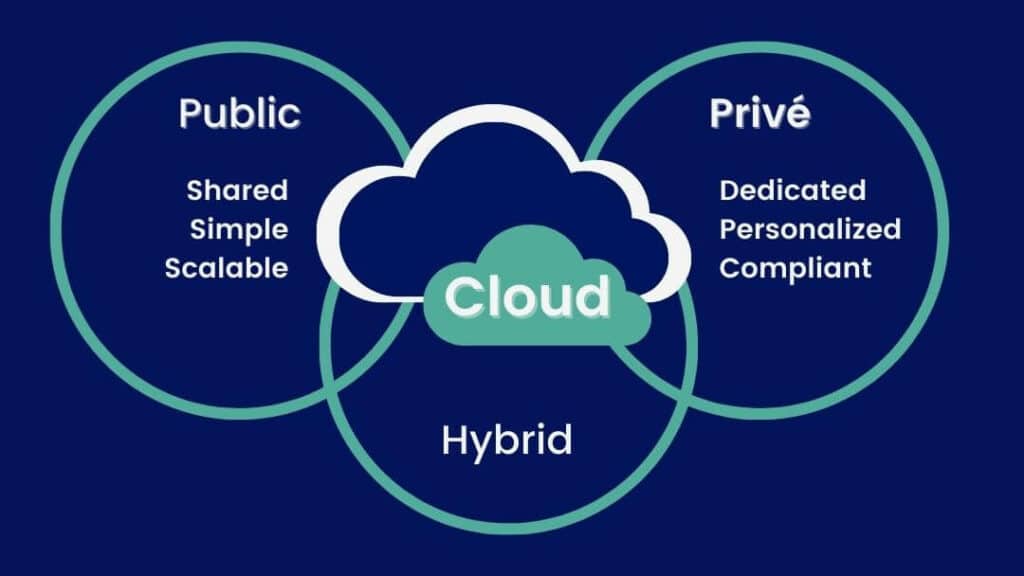
Illustration of how public, private, and hybrid clouds interconnect with users and data centers.
Credit: www.qiminfo.ch
Conclusion: Navigating The Cloud Computing Landscape
Understanding the different types of cloud computing is crucial for making smart technology choices. Cloud computing offers flexible options for businesses and individuals. Each cloud type and model serves unique needs and goals.
Choosing the right cloud approach helps optimize costs, improve efficiency, and increase security. Clear knowledge about deployment and service models guides better decisions. Below, key points and future trends provide a concise overview to navigate this evolving landscape.
Recap Of Essential Cloud Types And Models
Cloud computing is broadly divided into deployment and service models. Deployment models define how cloud resources are made available:
Public Cloud: Shared resources accessible over the internet.
Private Cloud: Exclusive cloud environment for a single organization.
Hybrid Cloud: Combination of public and private clouds for flexibility.
Community Cloud: Shared among organizations with common concerns.
Multi-Cloud: Use of multiple cloud services from different providers.
Service models deliver cloud capabilities at various levels:
Service Model Description Example
IaaS (Infrastructure as a Service) Provides virtualized computing resources over the internet. Virtual machines, storage, networks
PaaS (Platform as a Service) Offers platforms to develop, run, and manage applications. Application hosting, development tools
SaaS (Software as a Service) Delivers software applications via the internet. Email, CRM, collaboration tools
Serverless Computing Runs code without managing servers, using cloud resources automatically. Event-driven functions
Future Trends And Considerations In Cloud Computing
Cloud computing continues to evolve rapidly. Emerging trends will shape its future impact:
Edge Computing: Processing data closer to its source for faster responses.
AI Integration: Cloud platforms embedding artificial intelligence tools.
Enhanced Security: Stronger protection for cloud data and workloads.
Serverless Growth: Greater adoption of serverless models for efficiency.
Multi-Cloud Strategies: Using multiple providers to reduce risks and increase flexibility.
Organizations must consider compliance, cost control, and scalability when adopting cloud solutions. Staying updated on these trends ensures cloud investments remain valuable and adaptable.
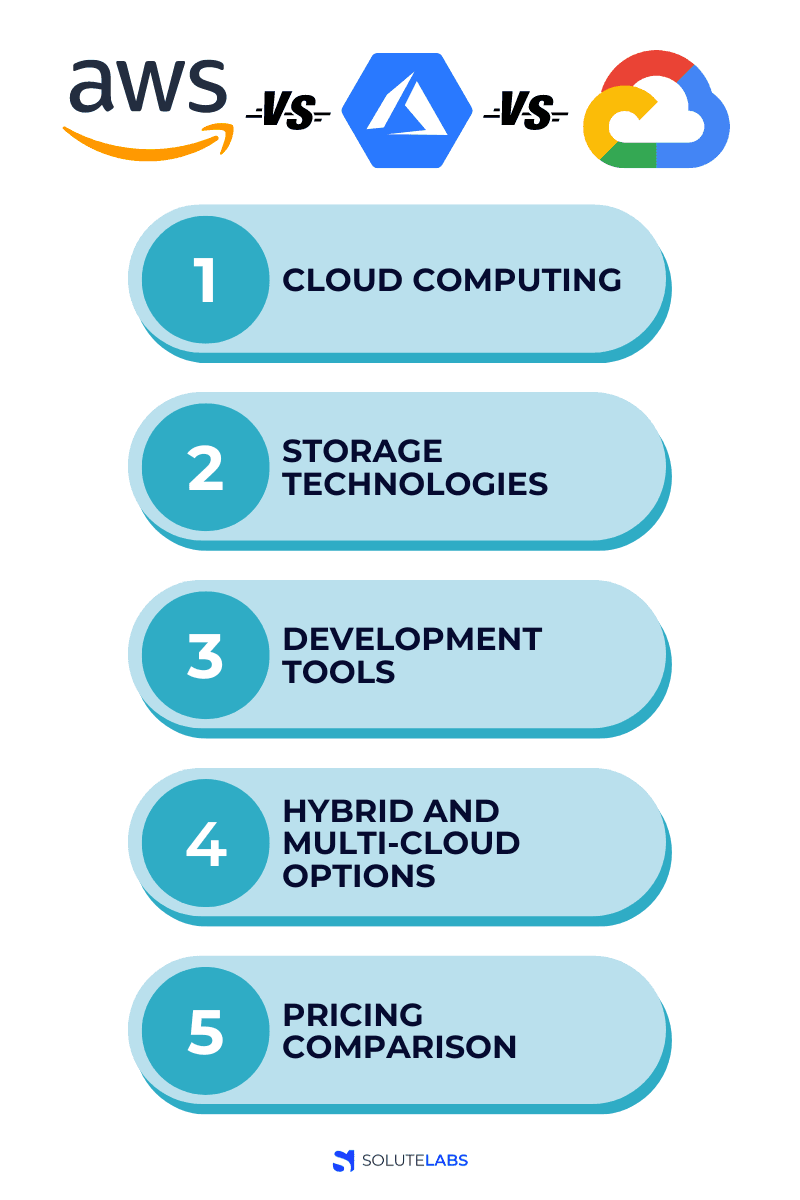
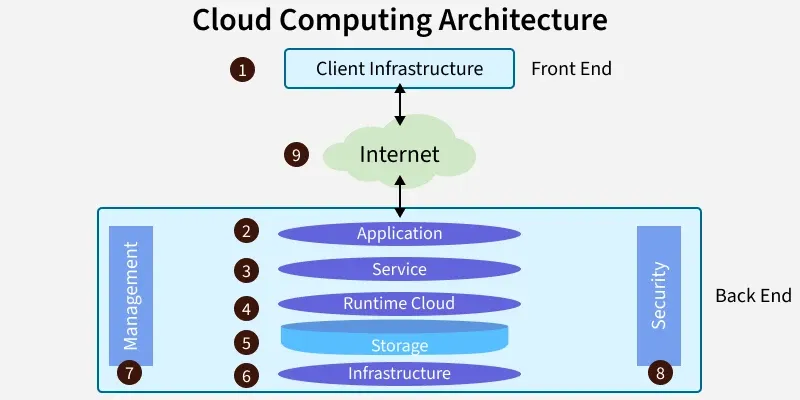
Comparison of the four main cloud service models and their management layers.
Credit: www.solutelabs.com
Frequently Asked Questions
What Are The 4 Types Of Cloud Computing?
The four types of cloud computing are public, private, hybrid, and community clouds. Each differs in access, security, and cost.
What Are The Three Main Cloud Computing?
The three main cloud computing types are Infrastructure as a Service (IaaS), Platform as a Service (PaaS), and Software as a Service (SaaS). Each offers different levels of control, flexibility, and management for users and businesses.
What Are The 4 Main Cloud Services?
The four main cloud services are Infrastructure as a Service (IaaS), Platform as a Service (PaaS), Software as a Service (SaaS), and Function as a Service (FaaS). These provide computing resources, development platforms, software applications, and event-driven functions respectively.
What Is Serverless Computing And When Should I Use It?
Serverless computing lets you run code without provisioning or managing servers. Use it for event-driven tasks, automated workflows, and applications with unpredictable or intermittent traffic. It shines for microservices, scheduled jobs, and real-time file processing.
How Do I Choose Between IaaS, PaaS, And SaaS?
Evaluate your team’s technical expertise and how much control you need over the underlying infrastructure. IaaS gives maximum control but requires skilled administrators. PaaS accelerates development by handling the runtime environment. SaaS is best for out-of-the-box software where customization is minimal.
Can I Mix Multiple Deployment Models?
Yes. Many organizations use a hybrid cloud that combines private and public clouds, and some also adopt a multi-cloud strategy by using services from several providers. This mix offers flexibility but requires careful planning around data integration and security.
How Does Edge Computing Differ From Centralized Cloud Computing?
Edge computing shifts data processing, storage, and application logic away from centralized regional data centers and places it geographically closer to the end user or physical devices (such as IoT sensors and cellular base stations). While traditional cloud computing aggregates workloads in massive server facilities for scale, edge computing minimizes latency for real-time analytics, industrial automation, and autonomous navigation.
What Is Vendor Lock-In And How Can Organizations Avoid It?
Vendor lock-in occurs when an organization builds its software architectures around proprietary APIs, proprietary database engines, or specialized runtime features of a single cloud provider, making it prohibitively expensive to migrate away. Teams avoid lock-in by designing workloads using open-source standards, packaging code in portable containers (like Docker), and using provider-agnostic infrastructure-as-code tools such as Terraform.
Conclusion
Understanding different types of cloud computing helps choose the right solution. Public, private, hybrid, and community clouds each serve unique needs. Service models like IaaS, PaaS, and SaaS offer various levels of control and flexibility. Knowing these types makes cloud technology easier to use and more effective. For a deeper dive, explore this detailed guide on Types of Cloud Computing. This knowledge supports better decisions for personal or business cloud use.
Ready to apply what you’ve learned? Compare your current workloads against the models above and identify where a migration could reduce costs or improve security. For real‑world examples of SaaS pricing and subscription models, take a look at our analysis of creative asset subscriptions and the typical subscription costs of popular software tools. Whichever model you choose, start with a single workload, monitor real usage for a month, and expand only once costs and performance match your expectations. Small, measured migrations consistently beat big-bang rollouts in practice — and they give you the hands-on data you need to adjust before committing more budget. Take action today by auditing your current software and infrastructure dependencies to identify your highest-return cloud opportunity.

Similar Posts