Subeasy Ai Lifetime Deal: Unlock Unlimited AI Power Today
Lead SaaS Analyst at PCSaaS · Software Developer · 500+ Tools Tested · Google Ads & Analytics Certified · 8+ Years Experience
The Subeasy AI Lifetime Deal gives creators lifetime access to Subeasy, an AI platform for accurate video transcription, subtitles and translation. This review covers its accuracy, language support, editing tools, pricing and who should grab the deal.
Subeasy Ai Lifetime Deal offers access to an AI-powered transcription and captioning tool designed for efficient, accurate audio-to-text conversion.
That’s where SubEasy AI steps in. With the Subeasy Ai Lifetime Deal, you get powerful tools to transcribe, translate, and caption your videos in over 100 languages—all with professional accuracy and speed. Imagine turning your videos into global content that anyone can understand, boosting your reach and engagement effortlessly. Ready to see how SubEasy AI can transform your videos and save you time? Don’t miss out—check out the deal here: Subeasy Ai Lifetime Deal and unlock lifetime access to this game-changing tool.
One-time payment · Lifetime access · No monthly fees

SubEasy AI’s main interface highlighting its transcription and translation capabilities. Credit: appsumo.com
Introduction To Subeasy Ai And Its Lifetime Deal
SubEasy AI offers a smart solution for video transcription and translation. It helps creators make their content accessible worldwide. The platform supports over 100 languages for transcription, translation, and captions.
The lifetime deal makes SubEasy AI affordable for long-term use. Buyers pay once and get unlimited access to powerful AI tools. This section explains what SubEasy AI is, details the lifetime deal, and highlights its market strengths.
What Is Subeasy Ai? Overview And Core Purpose
SubEasy AI is an AI-powered platform designed to transcribe and translate audio and video content. It offers clear, professional transcripts fast and supports more than 100 languages.
Transcribes audio and video with high accuracy
Translates transcripts into multiple languages
Creates captions and subtitles for videos
Offers AI voice dubbing for content localization
Integrates with ChatGPT for transcript-based queries
Helps repurpose content into blogs and summaries
Users can also customize subtitles, edit transcripts, and manage cloud storage for their media files. The platform suits content creators, marketers, and educators aiming for global reach.
Understanding The Lifetime Deal: One-time Payment For Unlimited Access
The lifetime deal provides long-term access with a single payment. No monthly fees or renewals. Several license tiers fit different needs, from casual users to heavy transcribers.
License Tier Price Monthly Credits Main Features
Tier 1 $49 200 Basic transcription and translation
Tier 2 $119 500 Includes video export in 4K, batch transcribe
Tier 3 $209 1,500 Advanced subtitle editor, AI companion access
Tier 4 $399 3,000 Full features, custom watermark, priority support
Each tier offers lifetime access to all future Pro Plan updates. The deal is backed by a 60-day money-back guarantee , ensuring buyer confidence.
Why Subeasy Ai Stands Out In The Ai Transcription And Translation Market
SubEasy AI offers a unique mix of features that sets it apart:
Wide language support: Over 100 languages for transcription and translation.
AI voice dubbing: Realistic voiceovers for localized content.
ChatGPT integration: Interactive transcript questions and content repurposing.
High-quality exports: Video exports up to 4K resolution.
Custom tools: Subtitle editing, speaker identification, and animated captions.
Flexible plans: Lifetime deal with multiple tiers to fit budgets.
Cloud storage: Safe, easy access to audio and video files.
These features make SubEasy AI a solid choice for creators wanting accurate, versatile transcription and translation tools.
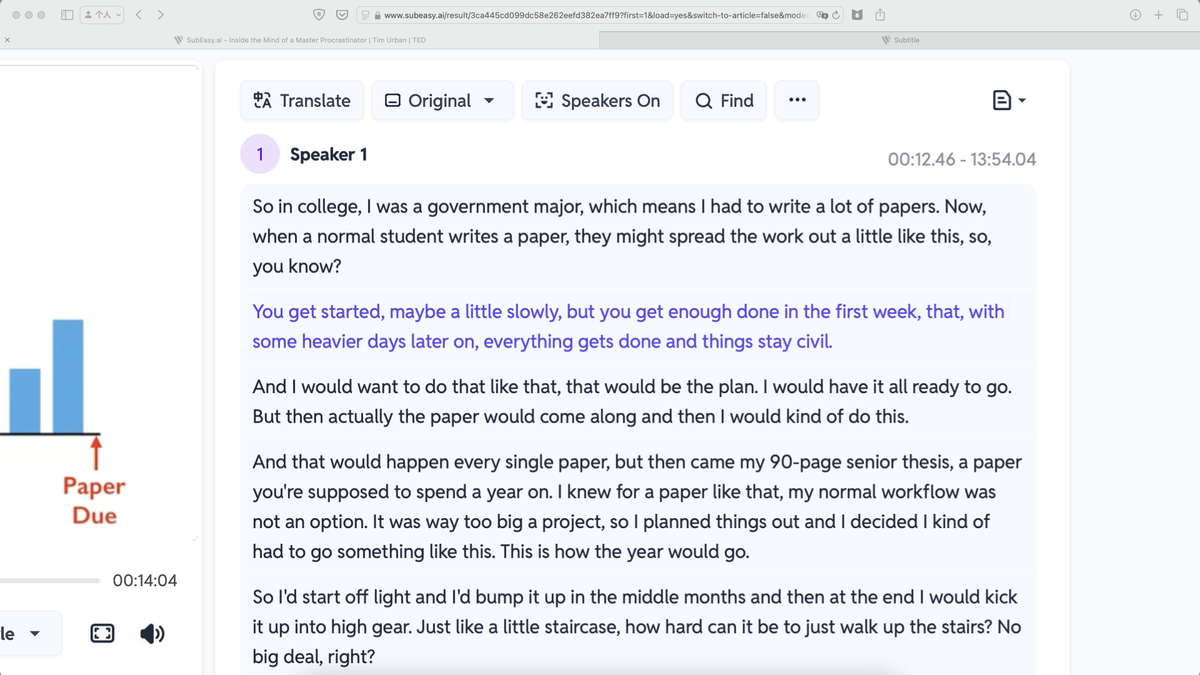
Workflow example of generating captions in multiple languages. Credit: appsumo.com
Key Features That Make Subeasy Ai Unique
SubEasy AI offers a powerful set of tools designed to simplify video transcription and translation. Its unique features deliver fast, accurate, and clear results. These features support creators and businesses in reaching wider audiences by breaking language and accessibility barriers. The platform’s technology combines ease of use with advanced AI capabilities.
Ai-powered Transcription: Accuracy And Speed Benefits
SubEasy AI uses advanced artificial intelligence to transcribe audio and video content quickly. It produces highly accurate transcripts that reduce errors. The tool handles professional-grade transcriptions in a short time. This makes content creation more efficient.
Fast processing of audio and video files
Clear and precise text output
Supports transcription in over 100 languages
In production environments, speech-to-text algorithms are commonly evaluated against benchmark frameworks maintained by organizations such as NIST to measure word error rate reductions. SubEasy AI’s automated engine handles varied speaker cadences and ambient studio conditions well, cutting down manual revision passes significantly.
Context-aware Translation For Global Audiences
The platform translates transcripts into more than 100 languages. Its AI understands context to keep the meaning intact. This helps connect with audiences worldwide without losing message quality.
Accurate translation maintaining original tone
Supports subtitles and captions in multiple languages
Enables global reach for video content
Timed Subtitles And Captioning: Enhancing Multimedia Accessibility
SubEasy AI creates timed subtitles and captions synced perfectly with video content. This feature improves accessibility for viewers with hearing difficulties and supports better engagement.
Precise timing for each subtitle
Customizable subtitle styles
Supports animated captions to boost visual appeal
User-friendly Interface And Seamless Integration
The interface is simple and easy to navigate. Users can upload files and manage projects without technical skills. SubEasy AI also integrates with ChatGPT for enhanced interaction with transcripts.
Clean, intuitive dashboard
Chat with AI to ask questions about transcripts
Batch transcribe multiple files
Support For Multiple Audio And Video Formats
SubEasy AI works with many common audio and video formats. This flexibility ensures users can transcribe and translate any content type.
Supported Formats Features
MP3, WAV, AAC High-quality audio transcription
MP4, MOV, AVI Video transcription and timed subtitles
Other common formats Batch processing and export in 4K
Step-by-Step Guide: How to Transcribe and Caption Videos in SubEasy AI
Getting started with SubEasy AI takes only a few minutes. Whether you are generating subtitles for social media clips or translating a full-length interview, following a structured workflow helps preserve monthly credits and minimize editing time:
- Importing Your Media File: Upload your pre-recorded video or audio file directly to the SubEasy dashboard. The platform supports direct file uploads up to 4K resolution alongside standard audio formats like MP3 and WAV.
- Setting Source and Target Parameters: Select your primary audio language from the dropdown menu of over 100 supported dialects. If you plan to distribute localized copies, choose your target subtitle languages here.
- Automated Speech-to-Text Processing: Run the AI engine. Processing speed typically averages about one-third of the total video length depending on file resolution and audio clarity.
- Fine-Tuning via the Timeline Editor: Open the built-in subtitle editor to adjust sentence breaks, fix proper nouns, or modify speaker labels. The visual timeline allows micro-adjustments down to millisecond increments.
- Styling and Animation Selection: Pick your font family, color scheme, background padding, or trending dynamic kinetic text animations popular on short-form social video feeds.
- Exporting Your Deliverables: Download your caption files as standard
.SRTor.VTTformats for YouTube and video players, or render a hardcoded MP4 file in resolutions up to 4K.
Creators who combine these subtitles with automated video production platforms can turn plain scripts into fully translated, finished multimedia packages without opening traditional desktop video editing software.
How SubEasy AI Compares to Other Transcription Tools
When choosing a transcription tool, it helps to see how SubEasy AI stacks up against popular alternatives like Rev, Otter.ai, and Descript. Each platform has strengths, but SubEasy AI’s lifetime deal gives it a unique cost advantage.
Rev offers human-reviewed transcripts but charges per minute (around $1.50/minute for transcription). For heavy users, costs add up quickly. SubEasy AI’s one-time payment eliminates recurring fees.
Otter.ai provides real-time transcription with a free tier, but its pro plan costs $16.99/month (billed yearly) and limits exports to plain text. SubEasy AI includes 4K video export, animated captions, and multilingual translation—features Otter lacks.
Descript combines transcription with video editing, but its business plan starts at $24/month per user. SubEasy AI’s Tier 1 at $49 lifetime offers comparable core transcription without monthly bills.
A common mistake is assuming all AI transcription tools handle accents equally well. In practice, SubEasy AI’s training data covers diverse speech patterns, reducing editing time for users who work with international speakers. For accessibility compliance, the platform aligns with WCAG guidelines on captions, making it a reliable choice for educational and corporate content.
If you’re curious about other lifetime software deals, the Fusebase Lifetime Deal and Newoldstamp Lifetime Deal offer similar one-time payment models for different business needs.
Comprehensive Transcription Tool Comparison
| Feature / Metric | SubEasy AI (AppSumo Lifetime) | Otter.ai (Pro Plan) | Descript (Creator/Pro) | Rev (Automated Service) |
|---|---|---|---|---|
| Pricing Structure | One-time payment ($49–$399) | $16.99/month recurring | $12–$24/month recurring | $0.25/min (automated) |
| Language Support | 100+ languages (Transcription & Translation) | English only (live translation limited) | 23+ languages | 30+ languages |
| Video Resolution Export | Up to 4K resolution rendering | No video rendering (audio/text only) | Up to 4K resolution rendering | No video rendering |
| Animated Social Captions | Built-in customizable styles | Not supported | Supported via template engine | Not supported |
| AI Voice Dubbing | Integrated multilingual voiceover | Not supported | Overdub feature (cloned voice) | Not supported |
| Interactive AI Assistant | ChatGPT transcript querying | Otter AI chat assistant | AI Actions assistant | Basic AI summary add-on |
| Subtitle Export Formats | SRT, VTT, TXT, Hardcoded MP4 | TXT, DOCX, PDF, SRT | SRT, VTT, Final Cut Pro XML | SRT, VTT, TXT |
Pricing And Affordability Breakdown
SubEasy AI offers a variety of pricing options designed for different needs. Its lifetime deal provides a cost-effective alternative to recurring subscriptions. Understanding the pricing tiers helps to decide which plan fits your budget and usage.
Analyzing The Lifetime Deal Cost Compared To Subscription Models
SubEasy AI’s lifetime deal includes four license tiers, each with fixed one-time payments. Subscription models often charge monthly or yearly fees, which add up over time.
License Tier Lifetime Deal Price Regular Price Credits Per Month
Tier 1 $49 $89 200
Tier 2 $119 $150 500
Tier 3 $209 $450 1,500
Tier 4 $399 $699 3,000
One-time payments mean no monthly bills. Over a year, subscription costs often exceed these lifetime prices.
For example, a Tier 2 user paying $119 once would break even against a $15/month subscription in about 8 months. After that, every month is pure savings. Even the highest Tier 4 at $399 pays for itself in under a year when compared to a typical $40/month pro plan. This long-term view makes the lifetime deal especially attractive for content creators who plan to use transcription tools consistently for years.
Value For Money: Long-term Savings And Benefits
Lifetime access covers all future Pro Plan updates. No extra fees for upgrades or new features.
Transcribe and translate videos in 100+ languages
Export videos in 4K resolution
Use advanced editors for subtitles and transcription
Chat with ChatGPT to query transcripts
Includes dubbing and AI voice-over capabilities
SubEasy AI combines many tools in one platform. This reduces the need to pay for separate services. Lifetime deals remove the stress of ongoing costs, making it budget-friendly over time.
Who Can Benefit Most From The Lifetime Deal Financially
The lifetime deal suits users with consistent transcription needs. Examples include:
Content creators uploading videos regularly
Businesses serving global audiences
Educators creating multilingual learning materials
Marketers producing captions and voice-overs
Users with heavy monthly transcription usage gain the best value. Smaller users may prefer lower tiers to start.
Overall, the deal offers financial advantages by eliminating monthly fees and adding long-term access to powerful features.
Transcription and translation in minutes
Pros And Cons Based On Real-world Usage
SubEasy AI offers a powerful tool for video transcription and translation. Real users have shared insights about its strengths and areas needing improvement. This section explores practical advantages and limitations based on actual use cases. Understanding these can help decide if SubEasy AI fits your transcription needs.
Advantages: Efficiency, Accuracy, And Global Reach
Efficiency is a key benefit of SubEasy AI. Users report fast transcription speeds that save hours compared to manual methods. The platform supports batch transcribing, which handles multiple files at once. This feature suits creators with large video libraries.
Accuracy also stands out. SubEasy AI delivers clear and precise transcripts, even with different accents or background noise. The speaker identification helps distinguish voices, improving transcript clarity. Many users find the AI-generated captions reliable enough for professional use.
Global reach is a major plus. SubEasy AI supports transcription and translation in over 100 languages. This makes it ideal for content creators targeting international audiences. The ability to dub videos with realistic AI voiceovers enhances accessibility and engagement worldwide.
Limitations: Potential Areas For Improvement
Some users note occasional errors in complex audio sections. Background noise or overlapping speech can reduce transcript accuracy. The AI sometimes struggles with industry-specific jargon or uncommon languages.
The advanced subtitle editor and transcription editor offer customization but may require a learning curve for new users. Some users desire more intuitive interfaces or tutorial support.
Cloud storage limits based on license tiers may restrict users with very large video archives. Upgrading plans can increase storage and credits but adds cost.
User Feedback Highlights And Common Experiences
Positive Feedback Constructive Feedback
Quick, professional-grade transcripts
Seamless integration with ChatGPT for transcript queries
Supports multiple formats including 4K video export
Lifetime access with affordable pricing tiers
Errors in noisy or technical audio
Interface complexity for beginners
Storage limits on lower-tier plans
Occasional delays with batch processing
User experiences show SubEasy AI works best for creators needing fast, accurate transcriptions and global language support. Some technical challenges remain, but regular updates improve the platform steadily.
Ideal Users And Use Case Recommendations
SubEasy AI suits a wide range of users who need accurate, fast transcription and translation services. It is perfect for anyone working with video or audio content that requires precise subtitles or multilingual captions. The platform’s features help improve content accessibility and reach, making it a valuable tool across various fields.
Content Creators And Social Media Influencers
Content creators and social media influencers benefit from SubEasy AI by turning their videos into accessible, engaging content.
Quickly generate accurate subtitles to boost viewer engagement.
Translate captions into over 100 languages to reach global audiences.
Use AI voiceovers to dub content without extra recording.
Repurpose transcripts into blog posts or summaries.
This tool saves time and expands content reach efficiently. Creators who focus on building a channel from scratch frequently rely on multi-language subtitles to capture global algorithmic recommendations early.
Businesses Requiring Multilingual Transcriptions And Captions
Businesses with international clients or diverse teams need clear communication across languages.
Generate professional-grade transcriptions for meetings and presentations.
Translate subtitles and transcripts to fit multiple languages.
Use dubbing features for video marketing campaigns in various regions.
Store audio and video files securely in the cloud.
SubEasy AI supports scalability and global communication.
Educators And Podcasters Needing Precise Subtitles
Educators and podcasters rely on clear subtitles for better audience understanding.
Produce accurate, time-synced subtitles for lectures and episodes.
Translate transcripts to reach students or listeners worldwide.
Identify speakers automatically to organize content effectively.
Integrate with ChatGPT to ask questions about transcripts.
This improves learning experiences and content accessibility.
Scenarios Where Subeasy Ai Maximizes Productivity And Reach
Scenario Benefit
Creating multilingual marketing videos Reach diverse audiences with translated captions and dubbing
Producing educational webinars Enhance comprehension with precise subtitles and transcripts
Publishing podcasts globally Attract international listeners via translated transcripts
Repurposing video content Generate blog posts and summaries from transcriptions
SubEasy AI streamlines content creation and expands global visibility.
Visual comparison of the four lifetime license tiers and their monthly credits. Credit: dealmango.com
Maximizing Global Reach: Multi-Language SEO and Repurposing Strategies
Adding accurate subtitles and translated transcripts does more than help hearing-impaired viewers; it functions as an organic reach multiplier across search engines and video platforms:
- Enhanced Search Indexing: YouTube and Google crawl closed caption tracks (
.SRTfiles). Adding translated subtitles gives search engines indexable text in multiple languages, opening up global search traffic without creating duplicate video files. - Workflow Synergy with Video Engines: If you produce faceless content using top-performing video generators, importing those renders directly into SubEasy AI ensures your pacing and subtitles match professional broadcast standards.
- Audience Optimization and Tagging: Pair clean transcripts with dedicated YouTube optimization tools to extract high-traffic keywords and search tags straight from spoken dialogue.
- Repurposing Audio into Long-Form Articles: Using SubEasy AI’s ChatGPT integration, you can summarize long webinars into newsletters and blog drafts while filtering out low-quality automated scripts to keep your written editorial standards sharp and human-readable.
Getting the Most Out of SubEasy AI: Tips and Best Practices
To maximize the value of your SubEasy AI lifetime deal, follow these practical tips based on real-world use. A common mistake is uploading low-quality audio and expecting perfect transcripts. For best results, ensure your audio is clear—use an external microphone and minimize background noise. SubEasy AI handles accents well, but speaking at a moderate pace improves accuracy.
Another tip is to use the batch transcribe feature for recurring content like weekly podcasts. Upload all episodes at once, let the AI process them overnight, and review transcripts the next morning. This workflow saves hours compared to processing files one by one.
When translating subtitles, always review the output for cultural nuances. While the AI is context-aware, idioms and humor may need manual tweaking. The transcription editor allows quick edits without re-uploading.
For marketers running campaigns, using SubEasy AI’s animated captions can boost engagement on social platforms. Pair this with the AI dubbing feature to create localized versions of your ads without hiring voice actors. Integrating with ChatGPT lets you ask questions about long transcripts, such as “Summarize the main points” or “Extract all product names mentioned”—a powerful shortcut for content repurposing workflows.
Finally, keep your media organized using the built-in cloud storage. Regularly archive completed projects to free up credits. If you need more storage, consider the Tier 3 or Tier 4 plans, which also include priority support.
Conclusion: Unlocking Unlimited Ai Power With Subeasy Ai
SubEasy AI offers a powerful tool to transcribe and translate videos in over 100 languages. It makes video content accessible worldwide with clear, fast, and professional transcripts. The lifetime deal gives long-term access to advanced features that help users create, edit, and share content easily.
With AI-powered dubbing, subtitles, and ChatGPT integration, SubEasy AI transforms how creators handle video content. This section breaks down the key benefits, the value of the lifetime deal, and how to start using SubEasy AI today.
Summary Of Key Benefits And Features
Transcribe audio and video accurately in 100+ languages.
Translate subtitles and transcripts to reach global audiences.
Dubbing with realistic AI voiceovers for diverse content needs.
Fast, professional-grade transcription and editing tools.
Integrates with ChatGPT to ask questions and get insights from transcripts.
Advanced editing features: subtitle editor, transcription editor, speaker identification.
Cloud storage for audio and video files keeps content safe and accessible.
Custom branding options like watermarking for professional use.
Plan Tier Monthly Credits Price (Lifetime) Key Features
Tier 1 200 $49 Basic transcription and translation, video export in 4K
Tier 2 500 $119 Batch transcribe, advanced editors, ChatGPT chat
Tier 3 1,500 $209 Priority transcription, dubbing, animated captions
Tier 4 3,000 $399 Full features, maximum credits, cloud storage
Final Thoughts On The Value Of The Lifetime Deal
The lifetime deal provides access to all future Pro Plan updates. No recurring fees. Choose the plan that fits your needs and save money over time.
It suits content creators, marketers, educators, and businesses aiming to reach a global audience. The deal is backed by AppSumo’s 60-day money-back guarantee for security.
Access to advanced AI tools, large transcription credits, and integration with ChatGPT makes this offer practical. It simplifies content repurposing and enhances video accessibility worldwide.
How To Get Started With Subeasy Ai Today
Visit the SubEasy AI AppSumo page .
Select the lifetime deal tier that matches your transcription needs.
Complete your purchase and activate your license within 60 days.
Upload your videos or audio files to start transcribing and translating.
Use the AI companion and editors to enhance and customize your content.
Start creating accessible videos that reach audiences worldwide with ease. The lifetime deal ensures you get ongoing updates and support without extra costs. Claim your access now through the official Subeasy Ai Lifetime Deal to lock in lifetime credits before the pricing tiers expire.
More Read: Vibeo Lifetime Deal – Create High-Converting Testimonial Videos Fast
Frequently Asked Questions
Is Subeasy Ai Legit?
SubEasy AI is legit, offering accurate AI-powered transcription and translation services. Users praise its lifetime deal and ease of use.
What Is The Subeasy Ai Lifetime Deal?
The Subeasy AI Lifetime Deal offers one-time payment access to AI-powered transcription and translation tools. It provides unlimited use of features like precise subtitles for audio and video content. This deal is ideal for content creators needing efficient and accurate transcription services.
How Does Subeasy Ai Improve Transcription Accuracy?
Subeasy AI uses advanced AI algorithms for context-aware transcription. It produces precise, time-stamped subtitles that match speech perfectly. This AI-driven approach reduces errors and improves clarity for global audiences, making content more accessible and professional.
Can I use SubEasy AI for live streaming captions?
SubEasy AI is designed primarily for pre-recorded content. It does not offer real-time captioning for live streams. For live events, you would need a separate solution like Otter.ai’s live transcription or a dedicated streaming caption service. However, the platform’s fast processing means you can generate captions minutes after your stream ends.
Does the lifetime deal include all future updates?
Yes, the lifetime deal covers all future Pro Plan updates. This means any new features, language additions, or performance improvements released for the Pro tier are included at no extra cost. The only exception is if AppSumo or SubEasy AI introduces a separate “Ultra” tier later—those features may require an upgrade.
What happens if I run out of monthly credits?
You can purchase add-on credit packs directly from your SubEasy dashboard. Pricing for extra credits is typically around $10 for 100 credits. Alternatively, you can upgrade to a higher lifetime tier at any time (paying the difference) to increase your monthly allowance.
Is my data safe with SubEasy AI?
SubEasy AI encrypts files in transit and at rest. The platform’s cloud storage uses standard security protocols. For sensitive content (e.g., confidential business calls), review their privacy policy. As a general best practice, avoid uploading data covered by strict regulations (like HIPAA) without confirming compliance. You can learn more about cloud storage best practices to keep your files secure.
What is the difference between soft and hard coded subtitles in SubEasy AI?
Soft subtitles are exported as separate text files (such as.SRT or.VTT ) containing timestamped dialogue. Viewers can toggle them on or off in media players and platforms like YouTube. In contrast, hardcoded (or “burned-in”) subtitles are rendered directly into the video stream during 4K MP4 export. Hardcoded subtitles guarantee your custom fonts, brand colors, and animations display consistently across all social media apps regardless of device settings.
Can SubEasy AI automatically identify different speakers in an audio file?
Yes, SubEasy AI includes automatic speaker diarization. The system analyzes pitch, vocal cadence, and frequency profiles to label speakers (e.g., Speaker 1, Speaker 2) across podcast recordings, interviews, and panel discussions. You can rename these labels to the speakers’ actual names directly inside the transcription editor before finalizing your export.
Do unused monthly credits roll over to the following month?
No, lifetime deal credits reset at the start of each monthly billing cycle based on your activated tier. Unused monthly credits do not roll over. If your workflow requires occasional spikes in processing volume, consider stacking to a higher tier or grabbing an add-on credit pack directly from your dashboard.
Conclusion
SubEasy Ai offers an easy way to transcribe videos in many languages. It helps you reach viewers worldwide with clear captions and translations. The tool works fast and provides accurate transcripts every time. You can even add AI voiceovers to your videos. Plans suit different needs and come with lifetime access. This deal gives you good value without ongoing fees. Explore how SubEasy Ai can improve your video content today. Check out the offer here: SubEasy Ai Lifetime Deal.

Similar Posts