

Discover the best budget hosting for bloggers. We compare top providers, pricing, and features to help you find the perfect fit. Start blogging today!
Blogging can be both exciting and rewarding; however, technical decisions—especially when it comes to choosing a hosting service—might discourage new bloggers from getting started. If you're new to blogging, you're likely seeking a low-cost, reliable hosting service that helps you launch your blog without straining your budget. The good news is that there are plenty of affordable hosting services with excellent features and support, making them ideal for beginners. This guide reviews some of the best options, highlights essential features to consider, and helps you make an informed choice for your blog's future growth. For more on this, see our guide on best monthly hosting.
Understanding Web Hosting
What Is Web Hosting, and Why Is It Crucial for Your Blog?
Web hosting is the service that makes your website or blog accessible online. It’s essentially the server that stores all the files, data, and content of your blog. Without hosting, no one can view your site. For new bloggers, reliable hosting is critical for maintaining performance. Slow load times, frequent downtimes, and technical problems can negatively affect user experience and SEO. So, it's important to select a hosting provider that offers both affordability and solid performance.
In practice, a blog that loads in under two seconds keeps visitors engaged and ranks higher in search results. According to Google's research on why website speed matters, a one-second delay can reduce conversions by up to 20%. For a new blogger, that lost engagement means fewer subscribers and slower growth. Even budget hosting can deliver acceptable speeds when paired with a content delivery network (CDN) and proper caching—features many low-cost providers now include. For more on this, see our guide on best cloud hosting for small business.
One common experience I’ve seen with beginners is underestimating how much a host’s WordPress‑specific optimizations matter. Even on a cheap plan, a host that caches at the server level and includes a free CDN can make your site feel twice as fast as a generic shared server. Always check whether your prospective host offers LiteSpeed or Nginx‑based caching out of the box—those small technical details often separate good budget hosts from frustrating ones.
Budget Hosting: Key Features to Look For
Performance (Speed and Uptime) Even the best content can be overshadowed by slow loading times or frequent downtimes. New bloggers need a hosting service that guarantees high uptime (the percentage of time your site is accessible) and fast load speeds. Look for a provider with at least 99.9% uptime and quick response times.
Customer Support As a new blogger, you'll likely have questions or run into technical issues. 24/7 customer support is essential. Whether you’re facing a website crash or need help tweaking your hosting settings, responsive support will save you time and frustration.
Scalability and Flexibility As your blog grows, so will your hosting needs. Look for a hosting service that offers scalability, allowing you to easily upgrade to advanced plans like VPS or dedicated hosting as your traffic increases.
Beyond these core features, also consider security measures beyond SSL: automated malware scans, DDoS protection, and daily backups are often bundled with budget plans but can be hidden upsells. A common mistake is assuming every cheap host covers backups — many charge extra for that vital safety net. Likewise, check whether the provider offers a staging environment so you can test changes before publishing live. These small details prevent headaches later.
Choosing Between Shared vs. VPS Hosting
As a beginner, you will likely be deciding between shared hosting or VPS (Virtual Private Server) hosting.
Which Option Is Best for New Bloggers?
Shared Hosting: This is the cheapest option and works well for small blogs with limited traffic. However, with shared hosting, your website shares resources (like bandwidth and CPU) with other websites, which can lead to slower speeds or downtime if another site experiences a surge in traffic.
VPS Hosting: A step above shared hosting, VPS offers more resources and better performance since your site is hosted on a virtual server. It's perfect for bloggers expecting more traffic or needing more control over their hosting, but it's more expensive than shared hosting.
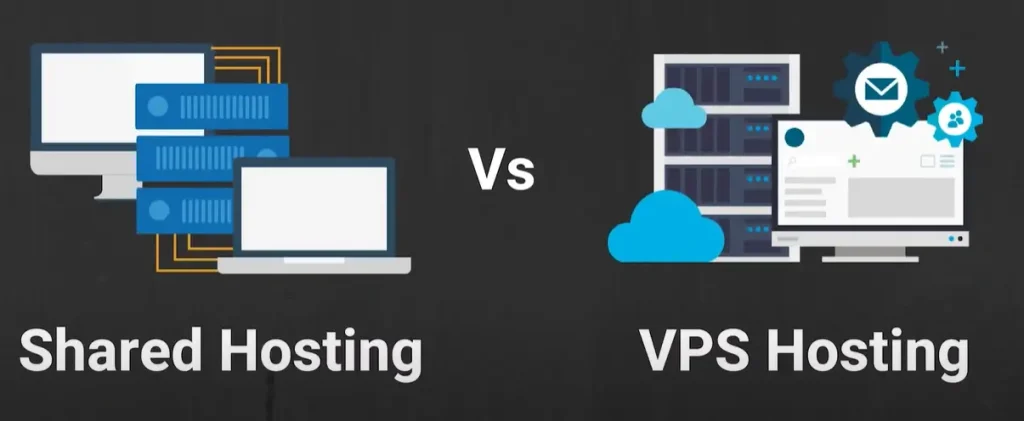
Side-by-side comparison of shared and VPS hosting for new bloggers
Importance of a Free Domain and SSL Certificate
Many budget hosting providers offer free domain registration and SSL certificates with their hosting plans.
Free Domain: This saves you money on your initial setup and adds a professional touch to your blog.
SSL Certificate: Essential for website security and SEO, SSL encrypts the data exchanged between your website and visitors, helping protect sensitive information and improving your search engine rankings.
Most budget hosts now offer free SSL certificates through Let's Encrypt, which is trustworthy and automatically renewed. Confirm that the provider includes this — if they charge extra, look elsewhere. For more on this, see our guide on best cloud hosting for ecommerce.
Best Budget Hosting for New Bloggers
Here are 10 affordable hosting services known for their performance, customer support, and great value for new bloggers. Choosing the right host service is one of the first and most important steps for new bloggers. Here are some of the best budget hosting options for new bloggers:
1. Bluehost
Price : Starting at $2.95/month (for basic plan)
Features : Free domain for the first year
1-click WordPress installation
24/7 support
50 GB SSD storage
Free SSL certificate
Why it's good for new bloggers : Bluehost is officially recommended by WordPress and offers great customer service, uptime, and easy-to-use features.
2. Hostinger
Price : Starting at $1.99/month
Features : Free SSL certificate
100 GB SSD storage
One website (for basic plan)
24/7 support
Easy WordPress installation
Why it's good for new bloggers : Hostinger is one of the most affordable hosting providers and offers great value for money. It's fast, with a user-friendly interface, and offers solid performance for beginners.
3. SiteGround
Price : Starting at $2.99/month
Features : Free daily backups
Free SSL certificate
SSD storage
24/7 support
30-day money-back guarantee
Why it's good for new bloggers : SiteGround is known for excellent customer support and a reputation for great uptime and speed. Though slightly higher in price, it offers solid performance for a blog that is growing.
4. DreamHost
Price : Starting at $2.59/month
Features : Free domain for the first year
Free SSL certificate
Unlimited bandwidth
1-click WordPress installation
97-day money-back guarantee
Why it's good for new bloggers : DreamHost offers affordable hosting plans with a generous money-back guarantee. It's easy to set up, fast, and has good customer service.

DreamHost's budget-friendly shared hosting interface
5. A2 Hosting
Price : Starting at $2.99/month
Features : Free SSL certificate
Unlimited SSD storage (on higher-tier plans)
24/7/365 support
Free website migration
Why it's good for new bloggers : A2 Hosting is known for its speed and performance, making it great for blogs with heavy traffic. Though it’s slightly more expensive, it offers solid speed optimization tools.
6. iPage
Price : Starting at $1.99/month
Features : Free domain for the first year
Free SSL certificate
Unlimited storage
24/7 support
Why it's good for new bloggers : iPage is affordable and simple to use, with great basic features for new bloggers. The unlimited storage makes it a great option for those who plan on growing their content library.
7. GreenGeeks
Price : Starting at $2.95/month
Features : Free domain for the first year
Free SSL certificate
Unlimited storage
Free nightly backups
24/7 support
Why it's good for new bloggers : GreenGeeks is an environmentally friendly hosting provider, offering reliable performance, excellent support, and solid features for the price.
8. Hostgator
Price : Starting at $2.75/month
Features : Free website builder
Free SSL certificate
One-click WordPress installation
24/7 support
45-day money-back guarantee
Why it's good for new bloggers : Hostgator is a well-known name in the hosting industry and offers great value for money. Its simple user interface and reliable uptime make it a good choice for beginners.
9. Tsohost
Price : Starting at $1.99/month
Features : Free domain
100 GB storage
Free SSL certificate
24/7 support
Why it's good for new bloggers : Tsohost offers affordable hosting with generous storage and solid customer support, making it a good choice for bloggers who are just starting out.
10. WPX Hosting
Price : Starting at $20.83/month
Features : Free SSL certificate
1-click WordPress installation
24/7 support (highly rated)
Custom control panel
Why it's good for new bloggers : Although a bit pricier, WPX Hosting is known for its lightning-fast speeds and high-end customer service. If you’re looking for premium performance at a higher budget, it’s a great option.
Quick Comparison Table
| Provider | Starting Price | Free Domain (1st yr) | Free SSL | Storage | Support | Best For |
|---|---|---|---|---|---|---|
| Bluehost | $2.95/mo | Yes | Yes | 50 GB SSD | 24/7 | WordPress beginners |
| Hostinger | $1.99/mo | No | Yes | 100 GB SSD | 24/7 | Ultra-budget |
| SiteGround | $2.99/mo | No | Yes | SSD (varies) | 24/7 | Growing blogs |
| DreamHost | $2.59/mo | Yes | Yes | Unlimited | 24/7 | Long trials |
| GreenGeeks | $2.95/mo | Yes | Yes | Unlimited | 24/7 | Eco-conscious |
| HostGator | $2.75/mo | No | Yes | Unlimited | 24/7 | Simple setup |
Note: All prices are introductory rates as of early 2026. Renewal rates are higher; check each host’s website for the latest offers.
How to Choose the Right Hosting for Your Blog
When selecting a hosting provider, consider:
Budget: Choose a plan that fits your budget but offers the features you need.
Traffic Expectations: If your blog is expected to grow quickly, select a provider that makes upgrading to higher-tier hosting easy.
Future Growth: Ensure the hosting provider offers flexibility, allowing you to scale up as your blog’s needs evolve.
Tips for Saving on Hosting Services
Look for Discounts and Promo Codes: Many hosting services offer promotional rates for new customers.
Pay for Longer Periods Upfront: You can save money by paying for a longer-term plan (e.g., three years).
Use Free Add-ons: Many hosts offer free SSL certificates or other services with their plans.
If you prefer not to commit to a long term, consider hosts that offer monthly billing flexibility — that way you can switch providers without a penalty if your needs change. Some budget hosts even have no-contract options.
The Hidden Costs of Cheap Hosting
While affordable hosting can seem like a great deal, be aware of hidden costs, such as:
Renewal Rates: Hosting services often offer steep discounts for the first term, but renewal prices can be much higher.
Add-ons: Features like backups, email hosting, or enhanced security may cost extra.
Also watch for domain privacy fees. Many cheap plans charge extra to hide your personal information from the public WHOIS database. A few providers include it free. Read the fine print before checkout. For more on this, see our guide on great hosting for online portfolios.
Benefits of Upgrading Your Hosting
As your blog grows, upgrading to a higher-tier hosting plan may become necessary. VPS or dedicated servers offer enhanced performance and scalability for handling increased traffic.
https://www.youtube.com/watch?v=EGz8c0ucBxs&t=185s
Performance Benchmarks: What to Expect from Budget Hosting
Even the cheapest shared plans can deliver acceptable performance for a new blog — typically 1–2 second load times for a lightweight WordPress site. However, performance varies by provider. For example, Hostinger and SiteGround consistently score well in third-party speed tests, while some ultra-cheap hosts may suffer from overselling and slower response times. For more on this, see our guide on best web hosting service for wordpress.
A good rule of thumb: aim for a Time to First Byte (TTFB) under 500 ms and an uptime above 99.9%. Most listed providers meet this, but check recent user reviews for real-world data. You can also use free tools like GTmetrix or Pingdom to test your site after signing up.
Comparing Money-Back Guarantees and Trial Periods
Not all refund windows are equal. Some hosts offer only 30 days; others give you nearly three months to decide. Here’s a quick look:
Hosting Provider Money-Back Guarantee Notes
Bluehost 30 days No refund after 30 days
Hostinger 30 days Domain fees not refunded
SiteGround 30 days Full refund including setup
DreamHost 97 days Most generous of the group
HostGator 45 days Good mid-ground option
GreenGeeks 30 days No refund on add-ons
iPage 30 days Money back minus domain fee
If you’re unsure about long-term commitment, a longer guarantee gives you breathing room to test customer support and performance with real traffic.
Email Hosting for Your Blog: What You Need to Know
Most budget hosting plans include basic email accounts (like you@yourblog.com). For a new blogger this is often enough. However, if you plan to send newsletters or marketing campaigns, dedicated email sending services perform better and avoid shared-IP blacklist issues. That’s where dedicated email marketing platforms come in — they handle deliverability and analytics properly.
For a growing blog, consider connecting your domain to a service like Mailchimp or ConvertKit rather than relying on your host’s mail server. This separation keeps your blog’s performance separate from your email reputation. If you're deciding which tool fits, spend some time comparing email service providers to find the best match for your list size and budget. For example, many beginners ask whether Mailchimp or ConvertKit is better for their workflow – you can check a detailed comparison of Mailchimp and ConvertKit to see which aligns with your content strategy. Also, if you are just starting a newsletter, exploring the best email marketing tools for startups can help you pick a platform that grows with your audience.
Getting the Most Out of Your Hosting: Essential Tools and Plugins
A well-configured blog can outperform a poorly optimised one even on the same shared server. Here are a few free or low-cost additions that maximize your hosting investment:
Caching plugin (e.g., WP Rocket or W3 Total Cache) — reduces server load and speeds up page delivery.
CDN (Cloudflare’s free plan works with almost every host) — distributes your content globally. You can set up Cloudflare’s free CDN in just a few minutes directly from your host’s control panel.
Security plugin (Wordfence or Sucuri) — adds a firewall and monitors for malware.- Image optimization (ShortPixel or Smush) — compresses images without losing quality.
Backup plugin (UpdraftPlus) — stores backups off-site in case your host’s backup fails.
Regularly update these plugins and your WordPress core to keep your site secure. If you need help writing better content, writing assistant tools can polish your posts before publishing – for example, comparing Grammarly vs ProWritingAid can help you choose the right editor. And once your traffic starts climbing, lead management solutions help you capture and nurture readers into subscribers. Also, keyword research becomes essential as you grow – using best SEO keyword tools can uncover topics your audience is searching for and help you write content that ranks.
Common Hosting Pitfalls for Beginner Bloggers
Even with a great budget host, beginners often trip over a few recurring issues. Recognizing them early can save you time and frustration.
Ignoring renewal prices until the first bill hits. Many bloggers sign up for a $2 plan and are shocked when it renews at $8 or more. Set a calendar reminder to re‑evaluate your plan before the promo expires.
Skipping backups because the host says they do them. Even if your host offers free nightly backups, it’s smart to keep a separate off‑site copy. A rogue plugin update or a hack can wipe your content; a second backup gives you peace of mind.
Choosing a host purely on price without checking support quality. A $1.99 host with slow, scripted support can cost you days of downtime. Read recent reviews on independent forums before committing.
Buying multiple years upfront on an untested host. A three‑year plan locks you in. Start with monthly or annual billing until you’re confident in the host’s performance and support.
Neglecting to set up a staging environment. Testing theme or plugin changes on a live site can break your blog. Use a staging site (many budget hosts offer it free) to preview updates before pushing them live.
Avoiding these mistakes will help you keep your blog running smoothly and avoid unexpected costs.
Frequently Asked Questions
What is the cheapest hosting for bloggers? Hostinger, GreenGeeks, and Bluehost offer plans starting at $2.49/month.
Can I upgrade my hosting later? Yes, most providers allow upgrades to more advanced plans like VPS hosting.
Do I need SSL for my blog? Yes, SSL is essential for security and SEO. Many hosts include SSL for free.
Is shared hosting enough for a new blog? For most new blogs, shared hosting is sufficient. However, VPS hosting may be needed as traffic grows.
Do cheap hosting services offer good customer support? Yes, many affordable services like SiteGround and Bluehost offer excellent support.
Are there hidden fees with affordable hosting? Some low-cost hosts may have hidden fees, such as high renewal rates or additional charges for extra features.
What happens if my blog outgrows shared hosting? Most providers offer a seamless upgrade path to VPS or dedicated servers. Before upgrading, assess your actual resource use (CPU, memory, bandwidth) to avoid overpaying. Many hosts also offer managed WordPress plans that handle scaling behind the scenes.
Should I buy a domain separately or use the host’s free offer? Free domain offers are great for saving upfront, but be aware that your domain is tied to that host for as long as the free period lasts. If you later want to move hosts, transferring the domain can be slightly more work. If you think you might switch providers within the first year, registering your domain separately is a safer bet.
How do I know if a budget host is reliable? Look beyond the price. Check independent review sites that measure real uptime and speed, and read recent customer testimonials — especially concerning support response times. A host that answers tickets in under an hour is worth paying a dollar more per month for.
What is the best WordPress hosting for a beginner on a tight budget? For most beginners, Hostinger or Bluehost offer the best balance of low cost, easy WordPress setup, and reliable support. If you want free daily backups and top‑tier support, SiteGround is a slightly pricier but excellent choice.
Can I use free hosting for my blog? Free hosting usually comes with severe limitations: slow speeds, forced ads, no custom domain, and no backups. It’s fine for a test site, but for a real blog that you want to grow, even a $2–$3/month budget plan is far superior.
How often should I check my blog’s performance after launching? Run a speed test (GTmetrix or Pingdom) right after launch, then again every month or after adding new plugins. Sudden slowdowns often signal a plugin conflict or resource limits from your host.
Conclusion
Starting a blog doesn’t need to be expensive. Many affordable hosting services, such as Bluehost, Hostinger, SiteGround, A2 Hosting, DreamHost, and GreenGeeks, provide excellent performance and support, making them ideal for budget-conscious new bloggers.
Ready to launch your blog? Pick a plan that fits your budget and start writing today — your readers are waiting.


3 thoughts on “Best Budget Hosting for Bloggers: Top Picks for 2026”
Hurrah! At last I got a website from where I know
how to actually get useful information regarding my study and knowledge.
I always look forward to your posts. They’re so well-written and helpful.